Showing posts with label Visual Studio. Show all posts

Wednesday, November 23, 2016

How to make Chrome support SSO, and enable CORS

Recently I migrated some SharePoint web parts from C# to JavaScript + HTML

Everything works well in IE 11 after enabling CORS.

But, when test it in Chrome 54, I got the error message below, and it constantly prompt for user name and password..

ERR_INVALID_HANDLE: "This site can’t be reached"

IIS log says it's requested by anonymous user.

After days of struggling, it turns out not as easy as it looks like.  We need to do the following steps.

1. IE -> internet options -> security -> Local Intranet zone

Add SharePoint Server and the Web App Server to "Local Intranet zone". So IE and Chrome will try to use the current windows user credential to log on web server.

This enables NTLM authentication on SharePoint and Web App Server.

Reference: https://sysadminspot.com/windows/google-chrome-and-ntlm-auto-logon-using-windows-authentication/

2. Configure Delegated Security in Google Chrome

Need to add server names as below to registry table on client computer.

We can do it through Group Policy.

[HKEY_LOCAL_MACHINE\SOFTWARE\Policies\Google\Chrome]
"AuthNegotiateDelegateWhitelist"="*.DomainName.local"
"AuthSchemes"="digest,ntlm,negotiate"
"AuthServerWhitelist"="*.DomainName.local"

[HKEY_LOCAL_MACHINE\SOFTWARE\Wow6432Node\Policies\Google\Chrome]
"AuthNegotiateDelegateWhitelist"="*.DomainName.local"
"AuthSchemes"="digest,ntlm,negotiate"
"AuthServerWhitelist"="*.DomainName.local"

This enables NTLM authentication and Kerberos on SharePoint and Web App Server.

Reference: https://specopssoft.com/configuring-chrome-and-firefox-for-windows-integrated-authentication/

3. Configure Kerberos

Set up SPN for both the SharePoint Server and the Web App Server.

Reference: https://support.microsoft.com/en-au/kb/929650

4. Change Startup.cs a bit in Configure() to handle preflight requests

This is for CORS.

Reference: http://stackoverflow.com/questions/38838006/asp-net-mvc-core-cors

5. Enable Anonymous Authentication on Web App Server

This is for CORS.

6. If Kestrel Server is not running, we need to submit "GET" request first.

It cannot be started up by "Preflight Options" request. It seems like a bug.

[update 2016-11-29] 7. To make things easier, add the settings below to the web.config file of Web App Server. 

This helps to enable CORS.

<httpProtocol>
  <customHeaders>
<clear />
<add name="Access-Control-Allow-Origin" value="http://SharePointSiteUrl" />
<add name="Access-Control-Allow-Headers" value="Authorization, X-Requested-With, Content-Type, Origin, Accept, X-Auth-Token" />
<add name="Access-Control-Allow-Methods" value="*" />
<add name="Access-Control-Allow-Credentials" value="true" />
<add name="Access-Control-Max-Age" value="60" />
  </customHeaders>
</httpProtocol>


Done.

=================

Test Environment.

Client side: Chrome 54 + JavaScript + JQuery 3.1.1

Server side: SharePoint Server 2016 CU201611 + Content Editor Web Part

Web App Server: IIS 8.5 + Asp.Net Core Web API 2 + C#

JavaScript + JQuery 3.1.1 (based on JSON, in a Content Editor Web Part)

var strUrl = "http://WebService2016dev.DomainName.local/SSO/AppTest1/api/SSOAuthentication";

var JSONObject= {"Key": "db25f36b-fa81-4c8e-9af5-9c8468ce8a79",
   "UserLoginName": "domain\\UserLoginName",
   "ReturnCode": "",
   "ReturnValue": "",
   "ReturnDetailedInfo": "" };
var jsonData = JSON.stringify(JSONObject);

$.support.cors = true;

var strMethodType = 'GET';
var strContentType = 'text/plain';

$.ajax( {
url: strUrl,
type: strMethodType,
contentType: strContentType ,
xhrFields: {
withCredentials: true
},
data: '',
dataType: "json",
async: false,
crossDomain: true,
success: function( response ) {
console.log("GET success - Data from Server: " + JSON.stringify(response));
},
error: function( request, textStatus, errorThrown ) {
console.log("GET error - You can not send Cross Domain AJAX requests: textStatus=" + textStatus + ", errorThrown=" + errorThrown);
console.log(request.responseText);
}
} );

var strMethodType = 'POST';
var strContentType = 'application/json; charset=utf-8';

$.ajax( {
url: strUrl,
type: strMethodType,
contentType: strContentType ,
xhrFields: {
withCredentials: true
},
data: jsonData,
dataType: "json",
crossDomain: true,
success: function( response ) {
console.log("POST success - Data from Server: " + JSON.stringify(response));
},
error: function( request, textStatus, errorThrown ) {
console.log("POST error - You can not send Cross Domain AJAX requests: textStatus=" + textStatus + ", errorThrown=" + errorThrown);
console.log(request.responseText);
}
} );

Web App Server (IIS 8.5 + Asp.Net Core Web API 2), main C# code in Startup.cs

app.Use(async (httpContext, next) =>
{
await next();
if (httpContext.Request.Path.Value.Contains(@"api/") && httpContext.Request.Method == "OPTIONS")
{
httpContext.Response.StatusCode = StatusCodes.Status204NoContent;
}
});

app.UseMvc();

Wednesday, February 17, 2016

How to generate new Visual Studio Solution from existing solution?

Most of posts on Internet suggest to create a new solution and feature in Visual Studio, then copy/attach the files to the new project. (such as this one)

I find another opotion.

After copying the whole Visual Studio solution/project to new folder, there are 4 parts we need to replace.

1. DLL new key
2. Solution ID
3. Feature ID
4. Change the Solution name, Feature name, Assembly name (and webpart / workflow action name if needed).

The first two steps are easy. Open the project in Visual Studio, then do the change straight away.

But the third step is tricky: we cannot just go to "Feature Designer" and replace the GUID in "Feature Id" property.  This ID is used in 7 different places and we cannot change them all in Visual Studio.

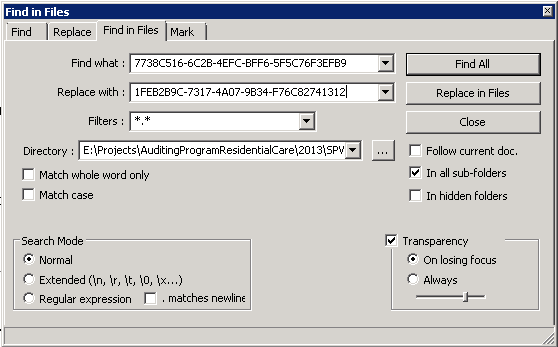
I did that through the famous freeware "Notepad++", go to "Search", then "Find in Files"


Below is the search result after clicking "Find All" button.  We can click "Replace in Files" button to replace all old Feature Id with new GUID.


Step 4 is similar to step 3.

That's it.

Now we can compile and publish the new solution file (.wsp) in Visual Studio, and then deploy it SharePoint.

PS:

To use new solution and feature to replace old solution and feature in farm, don't forget to uninstall the old feature and solution first, if you don't want to change the solution name or feature name.

Below is the PowerShell script.

Get-SPSite -Limit ALL | ForEach-Object {Disable-SPFeature -identity "FeatureName" -URL $_.URL -confirm:$false -ErrorAction SilentlyContinue}

Get-SPFeature | ?{$_.DisplayName -eq "FeatureName"} | Uninstall-SPFeature -confirm:$false -force

Get-SPSolution | ?{$_.DisplayName -like "SolutionName"} | Remove-SPSolution -confirm:$false -force

You can go to SharePoint system folder "C:\Program Files\Common Files\Microsoft Shared\Web Server Extensions" on all SharePoint servers, then search for the feature name, to confirm the feature is removed from farm completely.

Friday, January 24, 2014

Error "failed to start" when start workflow programmatically

When trying to start list workflow instance from a site workflow, I got an error "failed to start".

It doesn't happen all the time. For some list item, the list workflow instance was started successfully, but in 90% of cases, it just "failed to start".

However, if I cancel the workflow instance and then start it manually, it works well.

If I trigger the workflow through list item data change, it works well.

Quite annoying.

ULS doesn't help much. There are some unexpected error messages as below. But, why the workflow works well if not triggered by site workflow?

In the end, the problem disappeared after rebooting the SharePoint servers......


RunWorkflow: Microsoft.SharePoint.SPException:     at Microsoft.SharePoint.Workflow.SPNoCodeXomlCompiler.LoadXomlAssembly(SPWorkflowAssociation association, SPWeb web)     at Microsoft.SharePoint.Workflow.SPWinOeHostServices.LoadDeclarativeAssembly(SPWorkflowAssociation association, Boolean fallback)     at Microsoft.SharePoint.Workflow.SPWinOeHostServices.CreateInstance(SPWorkflow workflow)     at Microsoft.SharePoint.Workflow.SPWinOeEngine.RunWorkflow(SPWorkflowHostService host, SPWorkflow workflow, Collection`1 events, TimeSpan timeOut)     at Microsoft.SharePoint.Workflow.SPWorkflowManager.RunWorkflowElev(SPWorkflow workflow, C... 9c581dc6-197c-45ec-8777-2672890c0827
...ollection`1 events, SPWorkflowRunOptionsInternal runOptions) 9c581dc6-197c-45ec-8777-2672890c0827
Microsoft.SharePoint.SPException:     at Microsoft.SharePoint.Workflow.SPNoCodeXomlCompiler.LoadXomlAssembly(SPWorkflowAssociation association, SPWeb web)     at Microsoft.SharePoint.Workflow.SPWinOeHostServices.LoadDeclarativeAssembly(SPWorkflowAssociation association, Boolean fallback)     at Microsoft.SharePoint.Workflow.SPWinOeHostServices.CreateInstance(SPWorkflow workflow)     at Microsoft.SharePoint.Workflow.SPWinOeEngine.RunWorkflow(SPWorkflowHostService host, SPWorkflow workflow, Collection`1 events, TimeSpan timeOut)     at Microsoft.SharePoint.Workflow.SPWorkflowManager.RunWorkflowElev(SPWorkflow workflow, Collection`1 e... 9c581dc6-197c-45ec-8777-2672890c0827
...vents, SPWorkflowRunOptionsInternal runOptions) 9c581dc6-197c-45ec-8777-2672890c0827

RunWorkflow: Microsoft.SharePoint.SPException:     at Microsoft.SharePoint.Workflow.SPNoCodeXomlCompiler.LoadXomlAssem... 0add4c43-ff4e-440e-a01e-6bf3c5559cf9
...bly(SPWorkflowAssociation association, SPWeb web)     at Microsoft.SharePoint.Workflow.SPWinOeHostServices.LoadDeclarativeAssembly(SPWorkflowAssociation association, Boolean fallback)     at Microsoft.SharePoint.Workflow.SPWinOeHostServices.CreateInstance(SPWorkflow workflow)     at Microsoft.SharePoint.Workflow.SPWinOeEngine.RunWorkflow(SPWorkflowHostService host, SPWorkflow workflow, Collection`1 events, TimeSpan timeOut)     at Microsoft.SharePoint.Workflow.SPWorkflowManager.RunWorkflowElev(SPWorkflow workflow, Collection`1 events, SPWorkflowRunOptionsInternal runOptions) 0add4c43-ff4e-440e-a01e-6bf3c5559cf9
Microsoft.SharePoint.SPException:     at Microsoft.SharePoint.Workflow.SPNoCodeXomlCompiler.LoadXomlAssembly(SPWorkflo... 0add4c43-ff4e-440e-a01e-6bf3c5559cf9
...wAssociation association, SPWeb web)     at Microsoft.SharePoint.Workflow.SPWinOeHostServices.LoadDeclarativeAssembly(SPWorkflowAssociation association, Boolean fallback)     at Microsoft.SharePoint.Workflow.SPWinOeHostServices.CreateInstance(SPWorkflow workflow)     at Microsoft.SharePoint.Workflow.SPWinOeEngine.RunWorkflow(SPWorkflowHostService host, SPWorkflow workflow, Collection`1 events, TimeSpan timeOut)     at Microsoft.SharePoint.Workflow.SPWorkflowManager.RunWorkflowElev(SPWorkflow workflow, Collection`1 events, SPWorkflowRunOptionsInternal runOptions) 0add4c43-ff4e-440e-a01e-6bf3c5559cf9

Wednesday, January 15, 2014

The real purpose of LINQ

Finally I got the point that why we need "LINQ".

With the help of "LINQ", we can process a list of data in C#, just like what we do in SQL statements. The data in C# is no longer like a list of "single value", but a "stream". Instead of process one hundred variable (which normally stored in a List or an Array variable) one by one, we can process all the data in one go.

I know it's a bit late to understand such a simple concept. Well, better late than never.

:-)

Monday, November 11, 2013

Office Web Apps - Word Viewing Error - Happened again


This time I ran out of luck. Last time what I did was just installing windows updates and then reboot the system, but that didn't fix the problem.

Here is what I was facing:

1. "Excel" works fine, but "Word" and "PowerPoint" got error.

2. "Edit in browser" works fine, but not the "View in browser".

3. SilverLight is installed and enabled on server and client side.

4. Test documents are fine.

5. Service account have db_owner rights of the content databases;

6. Test farm works fine. The error only happened on Dev and Production farm.

7. I tried to turn on and off the "Sandboxed" settings. But nothing changed.

8. The farms are all SharePoint 2010 SP2 + CU201308.

So, what else can I do?

Well, this is a really long journey of trouble shooting. I guess most of you don't have interest to read through it. Let me show you the result first.

The problem is caused by the permission settings of "C:\Windows\System32\t2embed.dll"


For unknown reason (I guess it's caused by windows updates or anti-virus program), no user account can access this DLL file.

 We need to change its owner, and then recover the permission settings, for the same file on all SharePoint servers.

Now, let me show you what I did to figure that out.

At first, because this problem came from nowhere, I guess some SharePoint file was corrupted, so I moved the service to another SharePoint server. The problem was still there.


In site collection "/sites/Office_Viewing_Service_Cache", I can see the temporary files are created, but the file size is 1KB.

In ULS log, the relevant errors I noticed are:

GetCachedItem() result: ItemNotGenerated for item p_1_10.xml, document F422807d7bc2b46a48bfd7fb5c9d21922m16e96d7982d545798e3e35dd01314f6cmd60ff25cdb52489e94e180a605f1d348m

AppWorker:be19d243-dccb-48d5-aa76-c5a47398a553 response UnexpectedError sent for request fee30614-5705-4d40-abad-df636a7fdad1. Worker name WordServer, Document F422807d7bc2b46a48bfd7fb5c9d21922m16e96d7982d545798e3e35dd01314f6cmd60ff25cdb52489e94e180a605f1d348m

AppWorker:be19d243-dccb-48d5-aa76-c5a47398a553 recycle worker process because the conversion failed with result UnexpectedError. Worker is WordServer


So I started to check the windows folder.

In "C:\Windows\Temp\waccache" (and "C:\Windows\Temp\powerpointcache" for PowerPoint service), the "output.docx" was retrieved from SharePoint library, but there was no ".bundle" file.


In the sub folder, a "docdata.xml" was created, but no other files.

And they should look like below:


Not sure why the files could not be created, but it seems that "Word Viewing Service" didn't work properly. So I compared it in Dev and Test farm, nothing wrong. (This is done with the famous tool "SharePoint Manager 2010")


Then I checked the farm configurations, all OK.


Then I tested it with the help of Fiddler. There were "404" errors, which mean "could not find resource files" which suppose to be generated.


Maybe the service account doesn't have rights to access some folder or file?

I checked IIS authentication settings, and didn't see any problem.


Then I turned back to SharePoint.

I removed the server from the farm, then rejoined it. Still same.

Then I rebuilt "Word Viewing Service Application". Same.

Then I ran the scripts below and compared the result between Dev and Test farm. Could not find any problem.

$e = Get-SPServiceApplication | where {$_.TypeName.Equals("Secure Store Service Application")}
$e | Format-List *

$e = Get-SPServiceApplication | where {$_.TypeName.Equals("Security Token Service Application")}
$e | Format-List *

$e = Get-SPServiceApplication | where {$_.TypeName.Equals("ConversionService")}
$e | Format-List *

$e = Get-SPServiceApplication | where {$_.TypeName.Equals("Word Viewing Service Application")}
$e | Format-List *


$e = Get-SPServiceApplicationProxy | where {$_.TypeName.Equals("Word Viewing Service Application Proxy")}
$e | Format-List *


$e = Get-SPServiceApplication | where {$_.TypeName.Equals("Application Discovery and Load Balancer Service Application")}
$e | Format-List *

$e = Get-SPServiceApplicationProxy | where {$_.TypeName.Equals("Application Discovery and Load Balancer Service Application Proxy")}
$e | Format-List *


$e = Get-SPServiceApplication | where {$_.TypeName.Equals("PowerPoint Service Application")}
$e | Format-List *


$e = Get-SPServiceApplicationProxy | where {$_.TypeName.Equals("PowerPoint Service Application Proxy")}
$e | Format-List *


Then I repaired the SharePoint and Office Web Apps installation. Same.

In desperate, I uninstalled and then reinstalled "Office Web Apps" on Dev farm. The farm looked like been stomped by an elephant, but the problem was still there.

No choice. I started to dig into the DLL with the help of dotPeek.

In "C:\Program Files\Microsoft Office Servers\14.0\WebServices\ConversionService\Bin\Converter" and "C:\Program Files\Common Files\Microsoft Shared\Web Server Extensions\14\WebServices\PowerPoint\Bin\Converter", we can see the components.

Below is the code I guess threw out the exception.


However, I could not debug the code to see which parameter was incorrect. I think this is a dead end.

Luckily I got the same error with PowerPoint Service. When I tested it, the errors below were caught by ULS.

Loading of the server assembly failed System.IO.FileLoadException: Could not load file or assembly 'Microsoft.Office.Server.PowerPoint.Core.WebConversion, Version=0.0.0.0, Culture=neutral, PublicKeyToken=71e9bce111e9429c' or one of its dependencies. Access is denied.  File name: 'Microsoft.Office.Server.PowerPoint.Core.WebConversion, Version=0.0.0.0, Culture=neutral, PublicKeyToken=71e9bce111e9429c' ---> System.UnauthorizedAccessException: Access is denied. (Exception from HRESULT: 0x80070005 (E_ACCESSDENIED))   
 at System.Reflection.Assembly._nLoad(AssemblyName fileName, String codeBase, Evidence assemblySecurity, Assembly locationHint, StackCrawlMark& stackMark, Boolean throwOnFileNotFound, Boolean forIntrospection)   
 at System.Reflection.Assembly.InternalLoad(AssemblyName assemblyRef, Evidence assemblySecurity, StackCrawlMark& stackMark, Boolean forIntrospection)   
 at System.Reflection.Assembly.LoadFrom(String assemblyFile, Evidence securityEvidence)   
 at System.Activator.CreateInstanceFrom(String assemblyFile, String typeName, Boolean ignoreCase, BindingFlags bindingAttr, Binder binder, Object[] args, CultureInfo culture, Object[] activationAttributes, Evidence securityInfo)   
 at Microsoft.Office.Web.Conversion.Viewing.Host.AppServerWrapper.CreateServer()

AppWorker:fbba7a81-49b5-47cd-8ffc-49e010c2b281 worker call failed System.ServiceModel.CommunicationException: The server did not provide a meaningful reply; this might be caused by a contract mismatch, a premature session shutdown or an internal server error.    Server stack trace:    
 at System.ServiceModel.Channels.ServiceChannel.Call(String action, Boolean oneway, ProxyOperationRuntime operation, Object[] ins, Object[] outs, TimeSpan timeout)   
 at System.ServiceModel.Channels.ServiceChannelProxy.InvokeService(IMethodCallMessage methodCall, ProxyOperationRuntime operation)   
 at System.ServiceModel.Channels.ServiceChannelProxy.Invoke(IMessage message)    Exception rethrown
 at [0]:    
 at System.Runtime.Remoting.Proxies.RealProxy.HandleReturnMessage(IMessage reqMsg, IMessage retMsg)   
 at System.Runtime.Remoting.Proxies.RealProxy.PrivateInvoke(MessageData& msgData, Int32 type)   
 at Microsoft.Office.Web.Conversion.Framework.Remoting.IAppChannelCallback.Initialize(WorkerRequest request, FileItem fileItem)   
 at Microsoft.Office.Web.Conversion.Framework.AppWorker.ProcessRequest(ConversionRequest request). Worker name PowerPointServer, Document F25f87b4e13a2482a9382563c9b2c1861m83d394644d014e599244ea83257397feme2de2aff20cc494b8770142f561aa80dm


I double checked it. The service account have "full control" rights over the components folders. So there must be a "dependencies" dll failed the whole process.

The rest is quite simple. I downloaded Process Monitor, then tried to capture "ACCESS DENIED" error. That's how I caught the evil "t2embed.dll".

Done.


PS:

Do you like trouble shooting? :-)

Monday, October 21, 2013

New tools to help to manage site collections

I always use site collection as the basic unit to build SharePoint platform. So, if possible, I would create separate site collection instead of sub site when new site request pop up.

Inevitable, there will be a lot of site collections in the farm.

That's all right. We keep millions of records in SQL table, and it's much better than keeping them in thousands of files.

But sometimes it's annoying when we need to create, backup, restore or move site collections through PowerShell scripts. That's why I built this tool.

It's easy to write the PowerShell scripts to do the work. However, as a SharePoint administrator, I need to do that many times every week. In that case, this tool is handy.

Give it a try! It doesn't change anything of the SharePoint server, and just generate some PowerShell scripts, which you can run from PowerShell console.

Please let me know if you find anything can be improved, or want to add more functionalities to it.

=============================

SharePoint 2013. Winform tool to generate PowerShell scripts, to move, create, backup and restore site collections.
https://spsiteadmin2013.codeplex.com/

SharePoint 2010. Winform tool to generate PowerShell scripts, to move, create, backup and restore site collections.
https://spsiteadmin2010.codeplex.com/

[update, 2017-02-04]

https://github.com/Eric-Fang/SPSiteAdmin2016

https://github.com/Eric-Fang/SPSiteAdmin2013

==============================

Screenshots:


Thursday, August 1, 2013

Error Creating Control - Cannot find Web Project Item

I created a new SharePoint 2010 Visual Web Part project in Visual Studio 2012, and got the error message below when open a .ascx file in design mode:

Error Creating Control - LinkButtonSubmitCannot find web project item '~/sites/Sandpit/vwpUserProfileUpdate/vwpUserProfileUpdate.ascx'.

Warning message is:

Warning    1    E:\EricFang\VisualStudio\somepath\usercontrol.ascx: ASP.NET runtime error: Path cannot be null.
Parameter name: path    E:\EricFang\VisualStudio\somepath\usercontrol.ascx    1    1    usercontrol


I even could not drag and drop any control from the tool box to the web form.

I built some similar projects before, and this was the first time that got this error. So I compared the .csproj file with other projects, but didn't notice any difference which cause the problem.


Then I spent a while searching on internet. Many developers got similar issues, such as here and here, but they don't suit my case.

In the end, quite lucky, I noticed that in the "Site URL" of the project, I used the server alias name instead of the computer name. Since it wouldn't hurt, I changed it, and BING! The problem disappeared!

(This value is actually stored in ".csproj.user" file)

Friday, March 8, 2013

"Microsoft.Practices.SharePoint.Common" for SharePoint 2013

Can't find the SharePoint 2013 version at the moment, so I compiled one through Visual Studio 2012 on SharePoint 2013.

Below contains the source code and assemblies, you can download it here.

Source files:

Microsoft.Practices.SharePoint.rar

Assemblies and WSP files:

Microsoft.Practices.SharePoint.Assembly.rar

[Update, 2013-03-11]

During test, I got the error below.


System.MethodAccessException: Attempt by security transparent method 'Microsoft.Practices.SharePoint.Common.ServiceLocation.SharePointServiceLocator.GetCurrentFarmLocator()' to access LinkDemand protected method 'Microsoft.Practices.SharePoint.Common.SharePointEnvironment.get_CanAccessSharePoint()' failed.  Methods must be security critical or security safe-critical to satisfy a LinkDemand.
   at Microsoft.Practices.SharePoint.Common.ServiceLocation.SharePointServiceLocator.GetCurrentFarmLocator()
   at Microsoft.Practices.SharePoint.Common.ServiceLocation.SharePointServiceLocator.DoGetCurrent()
   at Microsoft.Practices.SharePoint.Common.ServiceLocation.SharePointServiceLocator.GetCurrent()


In terms of here, Security Transparency in .NET 4 is changed.

I cannot find a simple solution to fix the problem, so I removed all method attributes "[SharePointPermission(SecurityAction.LinkDemand, ObjectModel = true)]".

You can download the source code and assemblies from here:

Microsoft.Practices.SharePoint(LessSecure).rar

Tuesday, March 5, 2013

Visual Studio 2012 - An error occurred while trying to load some required components

I have three SharePoint 2013 virtual machines for development. On two of them, when trying to create a new project with "SharePoint 2013 - Empty Project" template, I got the error message:

"An error occurred while trying to load some required components. Please ensure that the following prerequisite components are installed:
Microsoft Web Developer Tools
Microsoft Exchange Web Services"


I don't see much difference among these three virtual machines. 
Google leads me to here first. I tried to register the dll in GAC, with no luck.
EwsManagedApi32.msi addlocal="ExchangeWebServicesApi_Feature,ExchangeWebServicesApi_Gac"
Then I found the post Prerequisite components error when creating a Visual Studio 2012 SharePoint 2013 App project .   It makes sense. So I followed it, with no luck.
Then I found that the module "Microsoft Exchange Web Services Managed API 2.0" was not installed with "Microsoft Office Developer Tools for Visual Studio 2012"!
Finally I realized the problem: I downloaded the full package of "Microsoft Office Developer Tools for Visual Studio 2012", which is called "officetools_bundle.exe".  But, obviously it's not enough to just install this module, and it needs to cooperate with a lot of other modules.
So, I uninstalled "Microsoft Office Developer Tools for Visual Studio 2012", and reinstalled it through "OfficeToolsForVS2012RTW.exe". This time, it works well.
Below is a screenshot I got at the end of the installation. We can see how many modules are installed and configured with "Microsoft Office Developer Tools for Visual Studio 2012".

Wednesday, May 2, 2012

Infopath: An unexpected error has occurred while verifying the form template

Recently when trying to deploy an InfoPath form to the Production server, I got this error: "An unexpected error has occurred while verifying the form template".

At first, I thought there was something wrong with this form. Google brought me here: http://social.msdn.microsoft.com/Forums/en/sharepointinfopath/thread/8219b3f6-e18c-42ee-b572-0459b912898c, which suggests that the form server may stopped working.   I started up "SharePoint Manager 2010", and compared the forms service settings between the development server and the production server, and could not find any difference.

No error message in windows events log.

Then, as usual, I start to monitor SharePoint system log, and noticed the error message below:


ConstructFromXsnFile failed with unhandled exception System.MissingMethodException: Method not found: '?????????'.    
 at System.ModuleHandle.ResolveMethod(Int32 methodToken, RuntimeTypeHandle* typeInstArgs, Int32 typeInstCount, RuntimeTypeHandle* methodInstArgs, Int32 methodInstCount)    
 at System.ModuleHandle.ResolveMethodHandle(Int32 methodToken, RuntimeTypeHandle[] typeInstantiationContext, RuntimeTypeHandle[] methodInstantiationContext)    
 at System.Reflection.Module.ResolveMethod(Int32 metadataToken, Type[] genericTypeArguments, Type[] genericMethodArguments)    
 at Microsoft.Office.InfoPath.Server.Converter.BusinessLogicScanner.VisitBody(MethodBase method, MethodInfoVisitor methodVisitor)    
 at Microsoft.Office.InfoPath.Server.Converter.BusinessLogicScanner.VisitBody(MethodBase method, MethodInfoVisitor methodVisitor)    
 at Microsoft.Office.InfoPath.Server.Converter.BusinessLogicScanner.VisitMethods(Type mainType, MethodInfoVisitor methodVisitor)    
 at Microsoft.Office.InfoPath.Server.Converter.BusinessLogicScanner.Analyze(Type mainType, List`1 rules)    
 at Microsoft.Office.InfoPath.Server.SolutionLifetime.BusinessLogicLoader.VerifyUsingFxCop(Assembly rootAssembly)    
 at Microsoft.Office.InfoPath.Server.SolutionLifetime.BusinessLogicLoader.Microsoft.Office.InfoPath.Server.SolutionLifetime.ISolutionComponent.Parse(XPathNavigator documentClassNode, XmlNamespaceManager solutionNamespaceManager, ConversionContext context)    
 at Microsoft.Office.InfoPath.Server.SolutionLifetime.Solution.ParseManifest(ConversionContext context, XPathNavigator node)    
 at Microsoft.Office.InfoPath.Server.SolutionLifetime.Solution.LoadFromXsn(ConversionContext context, SolutionCabinet solutionCabinet, SolutionIdentity solutionId)    
 at Microsoft.Office.InfoPath.Server.SolutionLifetime.Solution.<>c__DisplayClass2.b__0()    
 at Microsoft.Office.Server.Diagnostics.FirstChanceHandler.ExceptionFilter(Boolean fRethrowException, TryBlock tryBlock, FilterBlock filter, CatchBlock catchBlock, FinallyBlock finallyBlock)

Obviously, the code of the InfoPath form has some assembly reference which linked to a non-exist method on the production server, and that's the problem.  I forgot to upgrade that assembly on the production server!

Friday, December 2, 2011

How to redirect Infopath form to different site collection programmatically?

It's much harder than what it looks like.

At first, I thought it could be done by HttpContext.Current.Response.Redirect(), however, this is supported only if the destination page is in in "Internet Zone" (for IE).


Then, I tried SPUtility.Redirect(), and got the same result.


What about the "Source" query string? It works, but if you want to jump to another site collection, this error message will pop up: "The following location is not accessible, because it is in a different site collection".


Can we insert Javascript into InfoPath form?  No!


......


After hours of investigation, finally, I realized I was asking wrong question.   The correct one is:  How to utilize InfoPath web form in different site collection?  That is easy!


With the help of some javascript function, we can paste the script below to a Content Editor Web Part.  This CEWP can be inserted into any site collection of the same farm.


(This sample code also shows how to pass query parameter to InfoPath form)


<script language="javascript">
function getQuerystring(key, default_) 

    if (default_==null) 
    { 
        default_=""; 
    } 
    var search = unescape(location.search); 
    if (search == "") 
    { 
        return default_; 
    } 
    search = search.substr(1); 
    var params = search.split("&"); 
    for (var i = 0; i < params.length; i++) 
    { 
        var pairs = params[i].split("="); 
        if(pairs[0] == key) 
        { 
            return pairs[1]; 
        } 
    } 
    return default_; 
}


function OpenIPFormDialog()
{
var options = SP.UI.$create_DialogOptions();
options.url = 'http://' + window.location.hostname + '/sites/IPForm/Site1/_layouts/FormServer.aspx?XsnLocation=/sites/IPForm/FormServerTemplates/IPForm1.xsn&DefaultItemOpen=1&accountname=' + getQuerystring('accountname');
options.allowMaximize = true;
options.autoSize = true;
options.showClose = true;
SP.UI.ModalDialog.showModalDialog(options);
}
</script>
<a href="#" onclick="javascript:OpenIPFormDialog()">Change User Information</a>

Thursday, October 13, 2011

General solution to create Unique ID in InfoPath


How to allow business users to build InfoPath forms?   That's what developers need to think about. As what I can see, application developers should put more and more effort to make business users to build and change the system,  all by themselves.

Here, the best choice is web service. So users can create data connections easily, call them through rules, and bound them to controls.

Below is what I wrote recently, which can give users 5 different way to get a unique id.

Please be careful about the method "GenerateNextListItemID()".   If two users open a new form at the same time, they will get the same ID.   To avoid conflict, we need to submit the form through rules, and re-generate the ID before submitting the form.  But that need further control to avoid creating new form when user trying to update existing form.


        [WebMethod]
        public string GenerateGUID()
        {
            string strId = string.Empty;


            strId = Guid.NewGuid().ToString();
            return strId;
        }


        [WebMethod]
        public string GenerateShortGUID()
        {   //http://madskristensen.net/post/Generate-unique-strings-and-numbers-in-C.aspx
            string strId = string.Empty;


            byte[] buffer = Guid.NewGuid().ToByteArray();
            long lUniqueId = BitConverter.ToInt64(buffer, 0);


            StringBuilder sb = new StringBuilder(7);
            while (lUniqueId > 0)
            {
                int mod = (int)(lUniqueId % 62);
                if (mod < 10)
                {
                    sb.Append(mod);
                }
                else if (mod < 36)
                {
                    mod += 87;
                    sb.Append((char)mod);
                }
                else
                {
                    mod += 29;
                    sb.Append((char)mod);
                }
                lUniqueId = lUniqueId / 62;
            }


            strId = sb.ToString();


            return strId;
        }


        [WebMethod]
        public string GenerateNowCPUTicks()
        {
            return DateTime.UtcNow.Ticks.ToString();
        }


        [WebMethod]
        public string GenerateNowTimeString()
        {
            return DateTime.Now.ToString("yyyyMMddHHmmssFFF");
        }


        [WebMethod]
        public string GenerateNextListItemID(string strListUrl)
        {
            string strId = string.Empty;
            int iLastID = int.MinValue;


            try
            {
                SPSecurity.RunWithElevatedPrivileges(delegate()
                {
                    SPWSShared.sysWriteAppEntry(string.Format("strListUrl={0}", strListUrl));


                    using (SPSite objSPSite = new SPSite(strListUrl))
                    {
                        using (SPWeb objSPWeb = objSPSite.OpenWeb())
                        {
                            SPList objSPList = objSPWeb.GetList(strListUrl);
                            SPQuery objSPQuery = new SPQuery();
                            objSPQuery.Query = @"";
                            objSPQuery.ViewFields = @"";
                            objSPQuery.ViewFieldsOnly = true;
                            objSPQuery.RowLimit = 1;
                            SPListItemCollection objSPListItemCollection = objSPList.GetItems(objSPQuery);
                            if (objSPListItemCollection.Count > 0)
                            {
                                iLastID = objSPListItemCollection[0].ID + 1;
                            }
                            else
                            {
                                iLastID = 1;
                            }


                            strId = iLastID.ToString();
                        }
                    }
                });
            }
            catch (Exception ex)
            {
                SPWSShared.sysWriteAppEntry(string.Format("ex.Message={0}", ex.Message));
                SPWSShared.sysWriteAppEntry(string.Format("ex.StackTrace={0}", ex.StackTrace));
            }
            return strId;
        }


Monday, September 6, 2010

How to update lookup column through LINQ in SharePoint 2010

To update lookup field through LINQ, there is a tricky issue: we need to update "Display" column instead of "ID".

Below is the sample code.  The column "Animal" is a lookup column.

                using (ServerDataContext ctx = new ServerDataContext(strSiteUrl))
                {
                    EntityList<TestList1Item> Customers = ctx.GetList<TestList1Item>("testList1");
                    var query = from c in Customers.ToList()
                                select c;
                    foreach (var cust in query)
                    {
                        //cust.Animal.Id = 2;
                        cust.Animal.Title = "Dog";
                    }
                    ctx.SubmitChanges();
                }

Wednesday, July 7, 2010

How to add properties to visual web part

MSDN seems does not mention the details about how to add properties to visual web part. So I think it may help with sample code.

I found the link Referencing web part properties in SharePoint 2010 visual web part (I could not find the author of this post, and could not comment it), which really surprised me. Static variables suppose to be shared by different instances, which means we would not be able to specify different web part settings based on the same web part template in that way.  To confirm that, I did a quick test.  Below are the test code:


Below is the test result. We can see that all the web part instances share the same setting, which is wrong in most of the cases.

To fix that is quite easy:


Below is the final test result:


The source code are here:

--------------  VisualWebPart2.cs -------------

using System;
using System.ComponentModel;
using System.Web;
using System.Web.UI;
using System.Web.UI.WebControls;
using System.Web.UI.WebControls.WebParts;
using Microsoft.SharePoint;
using Microsoft.SharePoint.WebControls;

namespace VisualWebPartProject1.VisualWebPart2
{
    [ToolboxItemAttribute(false)]
    public class VisualWebPart2 : WebPart
    {
        // Visual Studio might automatically update this path when you change the Visual Web Part project item.
        private const string _ascxPath = @"~/_CONTROLTEMPLATES/VisualWebPartProject1/VisualWebPart2/VisualWebPart2UserControl.ascx";

        private string _LabelTestSettings = string.Empty;
        [WebBrowsable(true),
        Personalizable(PersonalizationScope.Shared),
        Category("User Settings"),
        DisplayName("test2"),
        WebDisplayName("test2"),
        WebDescription("test2")]
        public string LabelTestSettings
        {
            get { return _LabelTestSettings; }
            set
            {
                _LabelTestSettings = value;
            }
        }

        protected override void CreateChildControls()
        {
            VisualWebPart2UserControl control = (VisualWebPart2UserControl)Page.LoadControl(_ascxPath);
            control.LabelTestSettings = this.LabelTestSettings;
            Controls.Add(control);
        }
    }
}

--------------  VisualWebPart2UserControl.ascx.cs -------------

using System;
using System.Web.UI;
using System.Web.UI.WebControls;
using System.Web.UI.WebControls.WebParts;

namespace VisualWebPartProject1.VisualWebPart2
{
    public partial class VisualWebPart2UserControl : UserControl
    {
        public string LabelTestSettings { get; set; }

        protected void Page_Load(object sender, EventArgs e)
        {
            Label1.Text = this.LabelTestSettings;
        }
    }
}


Monday, May 31, 2010

How to add photos to user profiles programmatically in SharePoint 2010 RTM

Recently I got a task to upload some photos directly into SharePoint 2010 user profile store. After some research, I found the post How to upload a user profile photo programmatically  (by Péter Holpár). It's really good work, and basically works but need a little bit change in my case.


For some reason, I cannot get "ProfileImagePicker.LargeThumbnailSize" definition with Visual Studio 2010 RTM and SharePoint 2010 RTM. I think the code from Péter Holpár is based on beta version.

So I used the integer 128, 96 and 64 to replace LargeThumbnailSize, MediumThumbnailSize and SmallThumbnailSize.

Another problem is, "MethodInfo mi_CreateThumbnail = profileImagePickerType.GetMethod("CreateThumbnail", BindingFlags.NonPublic | BindingFlags.Static);" doesn't work. This is weird. I don't see the point for Microsoft to hide it from developers. Anyway, it's easy to get walkaround.

        public SPFile CreateThumbnail(Bitmap original, int idealWidth, int idealHeight, SPFolder objSPFolder, string strFileName)
        {
            SPFile objSPFile = null;

            System.Drawing.Image pThumbnail = original.GetThumbnailImage(idealWidth, idealHeight, null, new IntPtr());
            using (MemoryStream objMemoryStream = new MemoryStream())
            {
                pThumbnail.Save(objMemoryStream, System.Drawing.Imaging.ImageFormat.Jpeg);
                objSPFile = objSPFolder.Files.Add(strFileName, objMemoryStream.ToArray(), true);
            }

            return objSPFile;
        }

After that, we need to update the user profile property "PictureURL".


        objUserProfile[PropertyConstants.PictureUrl].Value = strPictureUrl;
        objUserProfile.Commit();

The variable strPictureUrl should be something like: "http://SharePointServer/my/User%20Photos/Profile%20Pictures/DomainName_UserLoginName_MThumb.jpg"

SharePoint 2010 will automatically choose the file with the correct size in different place. If you go to the user profile page, you will see the image file "DomainName_UserLoginName_LThumb.jpg" is displayed.

Updated at 07/07/2010:


Below is my code to upload photos "manually". So if you don't want to implement the functionality through reflector, you can do it this way.


        private string UploadPhoto(string accountName, string imageFilePath, SPFolder subfolderForPictures, ProfileImagePicker profileImagePicker)
        {
            string strPictureUrl = string.Empty;
            SPFile objSPFilePhoto = null;

            if (!File.Exists(imageFilePath) || Path.GetExtension(imageFilePath).Equals(".gif"))
            {
                writeLog(string.Format("File '{0}' does not exist or has invalid extension", imageFilePath));
            }
            else
            {
                string fileNameWithoutExtension = null;
                string charsToReplace = @"\/:*?""<>|";
                Array.ForEach(charsToReplace.ToCharArray(), charToReplace => accountName = accountName.Replace(charToReplace, '_'));
                fileNameWithoutExtension = accountName;

                string jpgExtension = ".jpg";

                try
                {
                    SPSecurity.RunWithElevatedPrivileges(delegate()
                    {
                        if (subfolderForPictures != null)
                        {
                            // try casting length (long) to int
                            byte[] buffer = File.ReadAllBytes(imageFilePath);
                            using (MemoryStream stream = new MemoryStream(buffer))
                            {
                                using (Bitmap bitmap = new Bitmap(stream, true))
                                {
                                    //0x20 small
                                    //0x60 medium
                                    //0x90 large
                                    //writeLog(string.Format("LThumb = {0}", fileNameWithoutExtension + @"_LThumb" + jpgExtension));
                                    CreateThumbnail(bitmap, 0x90, 0x90, subfolderForPictures, fileNameWithoutExtension + @"_LThumb" + jpgExtension);
                                    objSPFilePhoto = CreateThumbnail(bitmap, 0x60, 0x60, subfolderForPictures, fileNameWithoutExtension + @"_MThumb" + jpgExtension);
                                    strPictureUrl = objSPFilePhoto.Web.Site.Url + @"/" + objSPFilePhoto.Url;
                                    CreateThumbnail(bitmap, 0x20, 0x20, subfolderForPictures, fileNameWithoutExtension + @"_SThumb" + jpgExtension);
                                    //objSPFilePhoto = CreateThumbnail(bitmap, bitmap.Width, bitmap.Height, subfolderForPictures, fileNameWithoutExtension + jpgExtension);
                                    writeLog(string.Format("strPictureUrl = {0}", strPictureUrl));
                                }
                            }
                        }
                    });
                }
                catch (Exception ex)
                {
                    writeLog("ex.Message = " + ex.Message);
                    writeLog("ex.StackTrace = " + ex.StackTrace);
                }
            }

            return strPictureUrl;
        }