Showing posts with label InfoPath 2010. Show all posts

Thursday, April 13, 2017

Claims Authentication error: Trusted provider is missing. Provider: '00000003-0000-0ff1-ce00-000000000000'

Some end users reported missing emails from workflows, but they could not reproduce the problem, and me either. So I put it on hold.

A few weeks later, the same issue happened again.

The error messages in ULS are:

04/11/2017 10:14:30.55 w3wp.exe (0x2A3C) 0x6E48 SharePoint Foundation Claims Authentication amcbl Medium Trusted provider is missing. Provider: '00000003-0000-0ff1-ce00-000000000000' 97c8e69d-f945-3099-c843-9153fa257c74

04/11/2017 10:14:30.60 w3wp.exe (0x2A3C) 0x6E48 InfoPath Forms Services Runtime m0ib Medium Not persisting state for request due to previous errors. Form Template: urn:schemas-microsoft-com:office:infopath:workflowInitAssoc:-AutoGen-2017-04-07T00:12:12:113Z 97c8e69d-f945-3099-c843-9153fa257c74


After some investigation, I finally found how to reproduce the error.

Every time when SharePoint server is rebooted (for windows OS patching or something else), or after re-publishing the workflow, the workflow instances would not be triggered. Users have to trigger it again (manually or through a item level event) to make it work.

It only happened on 2010 version workflows.

That's interesting.

I replicated the site collection to DEV environment, and then tried it there. Same.

I created a new site collection in DEV, and built a new workflow there. The workflow worked well.

I compared all settings at different level (site collection, site, list, workflow, etc.), and could not find the problem.

SharePoint 2013 CU201703 is installed, but that doesn't help.

In the end, as the error mentioned that it's throw out by "InfoPath Forms Services", I decided to switch the workflow URL from

{Site URL}/_layouts/IniWrkflIP.aspx?List={List ID}&ID={Item ID}&TemplateID={Template ID}

to

{Site URL}/Workflows/{Workflow Name}/{Workflow Initiation Form Page}?List={List ID}&ID={Item ID}

The first one, by default, is used by SharePoint Standard and Enterprise edition; the latter is used by SharePoint Foundation server. Of course InfoPath form provides much more functionalities to the workflow initiation form. But in my case, we don't customise any workflow form.

The change can be done by the PowerShell script below:

Get-SPSite $SiteUrl | %{ Get-SPFeature -Site $_ |?{$_.DisplayName -eq "OffWFCommon"} | Disable-SPFeature -URL $SiteUrl}

Then, we have to rebuilt the workflow. (Thanks God, we can copy & paste workflow activities in SharePoint Designer now)

That's it.

If any one knows the root cause of this problem, could you please share it here?

Saturday, February 1, 2014

InfoPath is dead, then what will happen on SharePoint?

InfoPath is dead, but, it has been deeply integrated with SharePoint!

I knew it was going to die, and still get shocked by this news. However, after one minute, I realized that it could be good to all SharePoint professionals. We all know that there are so many limits/drawbacks with InfoPath, so a new form system could bring tremendous benefit to users.

The only question is, will the new system be as expensive as InfoPath? Does it need all users own a SharePoint Enterprise CAL even if they only want to view the forms?

Hopefully not.

Thursday, May 23, 2013

The best way to build InfoPath forms

For most of the InfoPath form system, the development of forms is always easy, even if there is some coding got involved.  The real problem is about form maintenance.

Let's imagine that you, as a SharePoint administrator or a InfoPath form developer, is in charge of 500 forms. Each form, on average, needs to be changed twice a year. So you need to modify 500 * 2 / 220 (work days) = 4.5 (forms per day).

What would happen if there are 5000 forms?

Based on my experience, most of the changes don't require to change the C# code. From technical point of view, they are just cosmetic changes. However, since C# code is part of the forms, developer have to do the changes! Or, do they?

Below is how I handle this situation. It minimizes the work of SharePoint administrator (or InfoPath developer).

1. Install InfoPath program on business users' computer.
.Net framework support is needed.

2. All forms and C# code are stored on SharePoint development server

3. Move form relevant C# code into a separate project.
Normally we need a dedicated project for each InfoPath system (a SharePoint site collection).
This project is a standard SharePoint feature (solution), which shared by all relevant forms of one project.

4. Share the form folder and C# assembly folder to relevant business users.
Business users can modify forms, but can only view C# assembly folder.


5. In form project, call the methods of that shared assembly to implement functionality.


6. Business users can modify the form whenever they want, and then deploy to another shared folder.
They can change all stuff except coding, which include rules, validation, data connection, text, views, etc.


7. Once they completed the changes, they can send an request to SharePoint administrator to deploy the changed forms to development environment or test environment.

8. SharePoint administrator deploy the new forms, then ask business users to test them.
Normally through PowerShell script.

9. Once the test is passed, these forms are ready to be deployed to Production.

What do you think of this procedure? Any comments are appreciated.


Wednesday, January 23, 2013

Last resort to remove InfoPath template from SharePoint

Bad things do happen.

No matter how hard I try, just could not remove a InfoPath form template which was quiesced successfully from farm.

Below are the error message I got during the struggling:

"The configuration database was queried for a non-existent object with the id bcd64dfc-9b17-020b-3bcd-3e01e80bf8a1. Most commonly, this is caused by removing an SPFeatureDefinition without writing upgrade code to remove references to the feature from each site."

"This form template was deployed as part of the  feature.  This form template should be removed only by uninstalling that feature."

"Feature with Id 'bcd64dfc-9b17-020b-3bcd-3e01e80bf8a1' is not installed in this farm. The feature was not uninstalled."

In the end, I lost my patience. Since it's in Development environment, I went to the SQL Server to try my luck.

1. Search the whole database to for the feature id or form id

2. Find the relevant records from table "SP_Config.dbo.Objects"

select top 100 * from SP_Config.dbo.Objects
 where [Properties] like '%urn:schemas-microsoft-com:office:infopath:IPMYFORM1:-myXSD-2013-01-06T05-53-40%'

3. Delete them.

delete from SP_Config.dbo.Objects
 where [ParentId] = 'bcd64dfc-9b17-020b-3bcd-3e01e80bf8a1'
delete from SP_Config.dbo.Objects
 where [Id] = 'bcd64dfc-9b17-020b-3bcd-3e01e80bf8a1'

4. Done.

By the way, the article Behind the Scenes of Administrator-Approved Form Templates is really good, helped me to understand the whole form deployment mechanism.   I strongly recommend to follow the suggestions from it before trying the database modification.


Friday, January 11, 2013

InfoPath 2010 "Failed to get SPGroupName from GroupID"

Recently got a warning message dialogue when trying to open an InfoPath form as normal user, which says "The security validation for this page is invalid".  If ignore it or log on as farm administrator, then it works well.


In the ULS logs I found the following message.
Failed to get SPGroupName from GroupID. Error Message: Group cannot be found.  Callstack:
at Microsoft.SharePoint.SPGroupCollection.GetByID(Int32 id)
at Microsoft.SharePoint.WebControls.PeopleEditor.set_SharePointGroupID(Int32 value).
After some googling, I found four possible solutions:
2. Turn off the security validation through Central Admin site

Unfortunately, none of them works.

From the ULS logs, we can see the problem is caused by "People Picker" control.The only thing I did with that control is a "Changed Event": when user selected a different person in that control, it triggers background code to populate the relevant fields.

Since there is no other option, I had to use a TextBox control and a "Verify" button to replace the "People Picker" control.

It works.

Wednesday, December 19, 2012

InfoPath form error "Can't move focus to the control because it is invisible"

Got a very weird error yesterday.

All of sudden, when opening an existing InfoPath form instance through IE8, the error below popped up.
Webpage error details
User Agent: Mozilla/4.0 (compatible; MSIE 8.0; Windows NT 5.1; Trident/4.0; GTB7.4; .NET CLR 1.1.4322; .NET CLR 2.0.50727; InfoPath.1; .NET CLR 3.0.4506.2152; .NET CLR 3.5.30729)
Timestamp: Mon, 17 Dec 2012 23:07:27 UTC
Message: Can't move focus to the control because it is invisible, not enabled, or of a type that does not accept the focus.
Line: 2
Char: 499033
Code: 0
URI: http://SharePointServer/_layouts/inc/Core.js?rev=D9rcLY97a1ECurcRSuOf8A%3D%3D
But, if I open the same form through IE 9+, Firefox or Chrome, then there is no problem at all.

I changed the form a little bit before the test users reported this issue, but I could not figure out what change caused it.

So I decompressed the XSN file to a folder, then compared the "manifest.xsf" and the view XSL file with the previous version, but, no luck.

So, after two days of struggling, in the end, I had to remove the fields from the form view part by part. In my case, a naughty DropDown list control field seems to be the source of pain, and I had to re-create it.

Things are resolved. I guess it's caused by a bug of InfoPath designer.

Hopefully this can save you some time. :-)

Wednesday, May 2, 2012

Infopath: An unexpected error has occurred while verifying the form template

Recently when trying to deploy an InfoPath form to the Production server, I got this error: "An unexpected error has occurred while verifying the form template".

At first, I thought there was something wrong with this form. Google brought me here: http://social.msdn.microsoft.com/Forums/en/sharepointinfopath/thread/8219b3f6-e18c-42ee-b572-0459b912898c, which suggests that the form server may stopped working.   I started up "SharePoint Manager 2010", and compared the forms service settings between the development server and the production server, and could not find any difference.

No error message in windows events log.

Then, as usual, I start to monitor SharePoint system log, and noticed the error message below:


ConstructFromXsnFile failed with unhandled exception System.MissingMethodException: Method not found: '?????????'.    
 at System.ModuleHandle.ResolveMethod(Int32 methodToken, RuntimeTypeHandle* typeInstArgs, Int32 typeInstCount, RuntimeTypeHandle* methodInstArgs, Int32 methodInstCount)    
 at System.ModuleHandle.ResolveMethodHandle(Int32 methodToken, RuntimeTypeHandle[] typeInstantiationContext, RuntimeTypeHandle[] methodInstantiationContext)    
 at System.Reflection.Module.ResolveMethod(Int32 metadataToken, Type[] genericTypeArguments, Type[] genericMethodArguments)    
 at Microsoft.Office.InfoPath.Server.Converter.BusinessLogicScanner.VisitBody(MethodBase method, MethodInfoVisitor methodVisitor)    
 at Microsoft.Office.InfoPath.Server.Converter.BusinessLogicScanner.VisitBody(MethodBase method, MethodInfoVisitor methodVisitor)    
 at Microsoft.Office.InfoPath.Server.Converter.BusinessLogicScanner.VisitMethods(Type mainType, MethodInfoVisitor methodVisitor)    
 at Microsoft.Office.InfoPath.Server.Converter.BusinessLogicScanner.Analyze(Type mainType, List`1 rules)    
 at Microsoft.Office.InfoPath.Server.SolutionLifetime.BusinessLogicLoader.VerifyUsingFxCop(Assembly rootAssembly)    
 at Microsoft.Office.InfoPath.Server.SolutionLifetime.BusinessLogicLoader.Microsoft.Office.InfoPath.Server.SolutionLifetime.ISolutionComponent.Parse(XPathNavigator documentClassNode, XmlNamespaceManager solutionNamespaceManager, ConversionContext context)    
 at Microsoft.Office.InfoPath.Server.SolutionLifetime.Solution.ParseManifest(ConversionContext context, XPathNavigator node)    
 at Microsoft.Office.InfoPath.Server.SolutionLifetime.Solution.LoadFromXsn(ConversionContext context, SolutionCabinet solutionCabinet, SolutionIdentity solutionId)    
 at Microsoft.Office.InfoPath.Server.SolutionLifetime.Solution.<>c__DisplayClass2.b__0()    
 at Microsoft.Office.Server.Diagnostics.FirstChanceHandler.ExceptionFilter(Boolean fRethrowException, TryBlock tryBlock, FilterBlock filter, CatchBlock catchBlock, FinallyBlock finallyBlock)

Obviously, the code of the InfoPath form has some assembly reference which linked to a non-exist method on the production server, and that's the problem.  I forgot to upgrade that assembly on the production server!

Friday, December 2, 2011

How to redirect Infopath form to different site collection programmatically?

It's much harder than what it looks like.

At first, I thought it could be done by HttpContext.Current.Response.Redirect(), however, this is supported only if the destination page is in in "Internet Zone" (for IE).


Then, I tried SPUtility.Redirect(), and got the same result.


What about the "Source" query string? It works, but if you want to jump to another site collection, this error message will pop up: "The following location is not accessible, because it is in a different site collection".


Can we insert Javascript into InfoPath form?  No!


......


After hours of investigation, finally, I realized I was asking wrong question.   The correct one is:  How to utilize InfoPath web form in different site collection?  That is easy!


With the help of some javascript function, we can paste the script below to a Content Editor Web Part.  This CEWP can be inserted into any site collection of the same farm.


(This sample code also shows how to pass query parameter to InfoPath form)


<script language="javascript">
function getQuerystring(key, default_) 

    if (default_==null) 
    { 
        default_=""; 
    } 
    var search = unescape(location.search); 
    if (search == "") 
    { 
        return default_; 
    } 
    search = search.substr(1); 
    var params = search.split("&"); 
    for (var i = 0; i < params.length; i++) 
    { 
        var pairs = params[i].split("="); 
        if(pairs[0] == key) 
        { 
            return pairs[1]; 
        } 
    } 
    return default_; 
}


function OpenIPFormDialog()
{
var options = SP.UI.$create_DialogOptions();
options.url = 'http://' + window.location.hostname + '/sites/IPForm/Site1/_layouts/FormServer.aspx?XsnLocation=/sites/IPForm/FormServerTemplates/IPForm1.xsn&DefaultItemOpen=1&accountname=' + getQuerystring('accountname');
options.allowMaximize = true;
options.autoSize = true;
options.showClose = true;
SP.UI.ModalDialog.showModalDialog(options);
}
</script>
<a href="#" onclick="javascript:OpenIPFormDialog()">Change User Information</a>

Thursday, November 24, 2011

How to build basic form without code

There are still many companies only have paper forms for office administration purpose, such as "Travel Request Form", "Reimbursement Form", etc.  Those are all most basic & simple requirements.   Is it possible to build the electrical forms without coding?   With the help of SharePoint Server 2010 and InfoPath 2010, it's quite easy.

1. Build an InfoPath form and publish it to SharePoint form library.
Here we need to be site owner to get enough rights to do the work.

2. If we don't want to let all users to see all form, we need to change the access control once the form is submitted.   I recommend to do that through a declarative workflow like below, which means we can build it through SharePoint designer 2010.


3. To send out an email like below, we need to get the proper links to open the form and to change the permissions.


Hi Jasper,


Pat submitted this form which asks for user account information changes, could you please review it?
You can click here to change the form access control.

(don't reply this email)


4. Below is about how to change the permissions of the current form.

It may take more than 8 hours for an advanced user to build the first form, but hopefully it can be reduced to less than 2 hours when he/she try to build the 5th form (most of the time is spent on building the form itself)

I know there are many other steps to fit the whole procedure, such as "SharePoint portal page", giving form proper name, publishing form fields to SharePoint form library, etc.   But none of them need coding, and all can be done easily.

There is one "tip" which I need to mention. To get the GUID of the form library (which is used by the hyperlink in email), we need to install a workflow activity "Get List GUID by List Title".   I built it and uploaded it CodePlex site. You can get some other workflow activities from the same place.

Please let me know if you have any question.

Thursday, October 13, 2011

General solution to create Unique ID in InfoPath


How to allow business users to build InfoPath forms?   That's what developers need to think about. As what I can see, application developers should put more and more effort to make business users to build and change the system,  all by themselves.

Here, the best choice is web service. So users can create data connections easily, call them through rules, and bound them to controls.

Below is what I wrote recently, which can give users 5 different way to get a unique id.

Please be careful about the method "GenerateNextListItemID()".   If two users open a new form at the same time, they will get the same ID.   To avoid conflict, we need to submit the form through rules, and re-generate the ID before submitting the form.  But that need further control to avoid creating new form when user trying to update existing form.


        [WebMethod]
        public string GenerateGUID()
        {
            string strId = string.Empty;


            strId = Guid.NewGuid().ToString();
            return strId;
        }


        [WebMethod]
        public string GenerateShortGUID()
        {   //http://madskristensen.net/post/Generate-unique-strings-and-numbers-in-C.aspx
            string strId = string.Empty;


            byte[] buffer = Guid.NewGuid().ToByteArray();
            long lUniqueId = BitConverter.ToInt64(buffer, 0);


            StringBuilder sb = new StringBuilder(7);
            while (lUniqueId > 0)
            {
                int mod = (int)(lUniqueId % 62);
                if (mod < 10)
                {
                    sb.Append(mod);
                }
                else if (mod < 36)
                {
                    mod += 87;
                    sb.Append((char)mod);
                }
                else
                {
                    mod += 29;
                    sb.Append((char)mod);
                }
                lUniqueId = lUniqueId / 62;
            }


            strId = sb.ToString();


            return strId;
        }


        [WebMethod]
        public string GenerateNowCPUTicks()
        {
            return DateTime.UtcNow.Ticks.ToString();
        }


        [WebMethod]
        public string GenerateNowTimeString()
        {
            return DateTime.Now.ToString("yyyyMMddHHmmssFFF");
        }


        [WebMethod]
        public string GenerateNextListItemID(string strListUrl)
        {
            string strId = string.Empty;
            int iLastID = int.MinValue;


            try
            {
                SPSecurity.RunWithElevatedPrivileges(delegate()
                {
                    SPWSShared.sysWriteAppEntry(string.Format("strListUrl={0}", strListUrl));


                    using (SPSite objSPSite = new SPSite(strListUrl))
                    {
                        using (SPWeb objSPWeb = objSPSite.OpenWeb())
                        {
                            SPList objSPList = objSPWeb.GetList(strListUrl);
                            SPQuery objSPQuery = new SPQuery();
                            objSPQuery.Query = @"";
                            objSPQuery.ViewFields = @"";
                            objSPQuery.ViewFieldsOnly = true;
                            objSPQuery.RowLimit = 1;
                            SPListItemCollection objSPListItemCollection = objSPList.GetItems(objSPQuery);
                            if (objSPListItemCollection.Count > 0)
                            {
                                iLastID = objSPListItemCollection[0].ID + 1;
                            }
                            else
                            {
                                iLastID = 1;
                            }


                            strId = iLastID.ToString();
                        }
                    }
                });
            }
            catch (Exception ex)
            {
                SPWSShared.sysWriteAppEntry(string.Format("ex.Message={0}", ex.Message));
                SPWSShared.sysWriteAppEntry(string.Format("ex.StackTrace={0}", ex.StackTrace));
            }
            return strId;
        }


General solution to retrieve data from SharePoint list view

It's not easy to retrieve data from SharePoint List View in InfoPath, especially for business users.  A link like below do the job, however, it asks for GUID of the list, and the internal name of filter field, which is not so easy to implement and maintain.

http://contoso/sites/sales/_vti_bin/owssvr.dll?Cmd=Display&List={115BC7B7-0A82-403E-9327-F3C73E6D37F3}&XMLDATA=TRUE&noredirect=true&FilterField1=xd__x007b_52AE1EF8_x002d_28E7_x002d_4CE4_x002d_AE23_x002d_54E23E80DDB5_x007d_&FilterValue1=Approved


Normally we can build a web service for that InfoPath data connection.


Let's say users want to retrieve data from a list view through Data Connection, and want to bind the data to Dropdown control.


The web service could be like below:


    public class ListData : System.Web.Services.WebService
    {
        public class ReferenceData
        {
            public ReferenceData() { }

            public int ID;
            public string Title;
        }


        [WebMethod]
        public ReferenceData[] getReferenceDataFromListView(string strListViewUrl)
        {  //parameter:   http://contoso/sites/sales/Lists/products/AllItems.aspx
            StackTrace objStackTrace = new StackTrace();
            string strLogMethodPrefix = objStackTrace.GetFrame(1).GetMethod().Name + "() - ";

            ReferenceData[] resultList = null;

            try
            {
                SPSecurity.RunWithElevatedPrivileges(delegate()
                {
                    using (SPSite site = new SPSite(strListViewUrl))
                    {
                        using (SPWeb web = site.OpenWeb())
                        {
                            SPView objSPView = web.GetViewFromUrl(strListViewUrl);
                            SPList currentList = objSPView.ParentList;
                            SPListItemCollection oSPListItemCollection = currentList.GetItems(objSPView);

                            resultList = new ReferenceData[oSPListItemCollection.Count];
                            int iIndex = 0;

                            foreach (SPListItem currentListItem in oSPListItemCollection)
                            {
                                resultList[iIndex] = new ReferenceData();
                                resultList[iIndex].ID = currentListItem.ID;
                                resultList[iIndex].Title = currentListItem.Title;
                                iIndex++;
                            }
                        } // using spweb web = site.openweb()
                    }
                });
            }
            catch (Exception ex)
            {
                SPWSShared.sysWriteAppEntry(string.Format(@"{0} ex, strListViewUrl={1}", strLogMethodPrefix, strListViewUrl));
                SPWSShared.sysWriteAppEntry(string.Format(@"{0} ex.Message={1}", strLogMethodPrefix, ex.Message));
                SPWSShared.sysWriteAppEntry(string.Format(@"{0} ex.StackTrace={1}", strLogMethodPrefix, ex.StackTrace));

                throw;
            }

            return resultList;
        }
    }

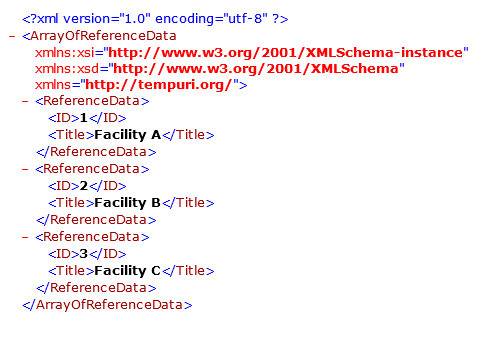
Below is the returned data.

As we can see, in the code, we need to define a internal class for the structure of the retrieved data.  It's possibly OK for small system, but in real world, we may need to create and maintain hundreds of classes, which is not acceptable.


A better solution is to build a general web service for all list views.


        [WebMethod]
        public XmlDocument getDataFromListView(string strListViewUrl)
        {   //parameter:   http://contoso/sites/sales/Lists/products/AllItems.aspx
            StackTrace objStackTrace = new StackTrace();
            string strLogMethodPrefix = objStackTrace.GetFrame(1).GetMethod().Name + "() - ";


            System.Data.DataTable objDataTable = null;
            XmlDocument xmlDoc = new XmlDocument();
            string strReturn = @"";


            if (string.IsNullOrEmpty(strListViewUrl))
            {
                strReturn += @"";
                xmlDoc.LoadXml(strReturn);
                return xmlDoc;
            }


            try
            {
                SPSecurity.RunWithElevatedPrivileges(delegate()
                {
                    using (SPSite site = new SPSite(strListViewUrl))
                    {
                        using (SPWeb web = site.OpenWeb())
                        {
                            SPView objSPView = web.GetViewFromUrl(strListViewUrl);
                            if (objSPView != null)
                            {
                                SPList currentList = objSPView.ParentList;
                                SPListItemCollection oSPListItemCollection = currentList.GetItems(objSPView);
                                //SPWSShared.sysWriteAppEntry(string.Format(@"{0} oSPListItemCollection.Count={1}", strLogMethodPrefix, oSPListItemCollection.Count));


                                objDataTable = oSPListItemCollection.GetDataTable();


                                string strItem = string.Empty;


                                strReturn += @"";
                                foreach (System.Data.DataRow currentItem in objDataTable.Rows)
                                {
                                    strItem = string.Empty;
                                    foreach (System.Data.DataColumn currentColumn in objDataTable.Columns)
                                    {
                                        strItem += string.Format("<{0}>{1}", currentColumn.ColumnName, currentItem[currentColumn.ColumnName]);
                                    }
                                    strReturn += string.Format("{0}", strItem);
                                }


                                strReturn += @"";
                            }
                            else
                            {
                                SPWSShared.sysWriteAppEntry(string.Format(@"{0} List view URL ({1}) is invalid!", strLogMethodPrefix, strListViewUrl));
                            }
                        }
                    }
                });
            }
            catch (Exception ex)
            {
                SPWSShared.sysWriteAppEntry(string.Format(@"{0} ex, List view URL ({1}) is invalid!", strLogMethodPrefix, strListViewUrl));
                SPWSShared.sysWriteAppEntry(string.Format(@"{0} ex.Message={1}", strLogMethodPrefix, ex.Message));
                SPWSShared.sysWriteAppEntry(string.Format(@"{0} ex.StackTrace={1}", strLogMethodPrefix, ex.StackTrace));


                throw;
            }


            if (objDataTable != null)
            {
                xmlDoc.LoadXml(strReturn);
            }


            return xmlDoc;
        }

Below is the returned data.


Done.


Below are some screen shots regarding how to configure it in InfoPath.


Wednesday, September 28, 2011

Infopath - Unique form number/name generation?

This problem is always there when building InfoPath web forms.   As I know, there are many options:

  • Use "user login name" + "current time" as unique id;
Need to create a field for "unique id", and if there are millions of users, it may cause some potential conflict problem.
The "unique id" can be used as part of the file name.
The "unique id" could be quite long.
No coding needed.
  • Generate the unique ID through workflow after the form is submitted
Need to create a field for "unique id", and  need to promote this field to SharePoint column;  this column needs to be editable.
This id normally is based on the "Item ID" of the form file.
Normally cannot use this id as file name.
Can only generate the "unique id" after the form is submitted.
No coding needed
  • Generate the unique ID through coding
Need to create a field for "unique id".
The "unique id" can be used as part of the file name.


The last solution is my favorite. It's very flexible and easy to maintain.  Once the source code is ready, not hard to re-use it.

Below is the code which generate a GUID then convert it into a 11 characters unique ID string.

        public void setFileNameField()
        {
            string strElementPath = string.Empty;

            strElementPath = @"/my:myFields/my:FileName";
            XPathNavigator objFormFileName = MainDataSource.CreateNavigator().SelectSingleNode(strElementPath, NamespaceManager);
            string strFormFileName = objFormFileName.Value;
            if (string.IsNullOrEmpty(strFormFileName))
            {
                strFormFileName = string.Format("{0}", GenerateUniqueId());
                objFormFileName.SetValue(strFormFileName);
            }
        }

        public string GenerateUniqueId()
        {   //http://madskristensen.net/post/Generate-unique-strings-and-numbers-in-C.aspx
            string strId = string.Empty;

            byte[] buffer = Guid.NewGuid().ToByteArray();
            long lUniqueId = BitConverter.ToInt64(buffer, 0);

            StringBuilder sb = new StringBuilder(7);
            while (lUniqueId > 0)
            {
                int mod = (int)(lUniqueId % 62);
                if (mod < 10)
                {
                    sb.Append(mod);
                }
                else if (mod < 36)
                {
                    mod += 87;
                    sb.Append((char)mod);
                }
                else
                {
                    mod += 29;
                    sb.Append((char)mod);
                }
                lUniqueId = lUniqueId / 62;
            }

            strId = sb.ToString();

            return strId;
        }

        public void FormEvents_Loading(object sender, LoadingEventArgs e)
        {
            setFileNameField();
        }