Showing posts with label SharePoint 2007. Show all posts

Thursday, May 30, 2019

When to use folder in SharePoint list/library?

Just read a nice article. I agree with Joanne Klein, but I only see two practical reasons to use folder.

1. Permission control.
2. Too many items in one list/library.

So, if there is choices, go for metadata!

Monday, July 2, 2018

The confusion when a user just moved from Shared Folder to SharePoint

Traditionally, how a user write a document?
  1. Launch a MS Office Program, such as MS Word;
  2. Give the document a topic;
  3. Put content into it;
  4. Save.
The problem with SharePoint is the 4th step: "Save". "How can I save the document to SharePoint?" This is one of the most common questions.


One option is to map a SharePoint document library to local network mapped folder:

For SharePoint On-Premise:


For SharePoint Online:


Then users can save the document to that Shared Drive directly, just like what they did with "Shared Folder".

That works, but then we lost most of the benefit from SharePoint.

"SharePoint" means team work. So if a user wants to write a document, below are the steps.
  1. Ask themselves the question: Where should I store this document, so other users can find it easily?
  2. Who should have rights to view it, and who should be able to modify it?
  3. What kind of metadata should this document has? So users can get the basic information without opening it, such as "due date, document owner, project name, etc.".
  4. Go to the SharePoint document library in web browser (IE 11 is recommended at the moment), then click "new" button.
If we want to get thousands of documents to be organised well, please think about the document management (as a team) with each of the documents.

SharePoint cannot do that by itself.

PS: Thanks for the reminding from my colleague Andrew Warland, nowadays, users can save the document to SharePoint sites with the help from the latest MS Office. That saves a lot of trouble.

It's still better to think more for other team members at the very beginning.


Tuesday, July 29, 2014

What is SPListItem/SPFile anyway?

When I started to touch SharePoint years ago, it's natural to treat "List" as "SQL table". They have so many similar features:

Features in commonSQL ServerSharePoint
ContainerDatabaseSite
OperationsInsert,Update,Delete,QueryInsert,Update,Delete,Query
MetadataColumnsColumns
Data volumeBillions of recordsMillions of records
Event triggerYesYes
Query languageSQLCAML

Apart from the exciting SharePoint features, such as versioning, soon I noticed two differences.
  1. All SPListItems are stored in one SQL table;
  2. Compare to SQL Server, "Insert,Update,Delete" operations of SPListItem are extremely slow;
Now, can we treat a SPListItem as a record in SQL table, with advanced features and poor performance on modification? And, further more, can we treat SPList as a SQL table which allow site owners to customize?

Definitely NOT!

This is the conclusion I got after seven years of development and administration on SharePoint platform. Believe it or not, I feel that SPListItem/SPFile is actually Message, and SPList/SPContentType is Queue.

Let me show an example here.

If there are millions of items in a SPList, and we need to update the "Title" field of all data based on some rules, how should we do it? We cannot update data in batch, instead, we have to do the update one by one. This is how we process messages, not records.

Once we understand this point, then it's easy to understand why all SPListItems are stored in one SQL table, why the modification is so slow, and how we can utilize SharePoint in better way.

What do you think? Any comments are welcome!

Wednesday, February 20, 2013

How to prevent site owners to create sub site

If you agree that we should keep sub sites at minimum, the PowerShell script below can help to prevent site owners to create sub sites.

This script also revoke the "delete historical versions" permission from contributors. That's what I do for almost all site collections.

Add-PSSnapin Microsoft.SharePoint.PowerShell -ErrorAction "SilentlyContinue" 


# remove "DeleteVersions" from "Contribute" 
# remove "ManageSubwebs" from "Full Control" 
function ChangePermissionLevel([string]$SiteUrl) 

 $web = Get-SPWeb -Identity $SiteUrl 
 $contributePermissionLevel=$web.RoleDefinitions["Contribute"] 
 # $contributePermissionLevel.BasePermissions="ViewListItems, OpenItems, ViewVersions, ManagePersonalViews, ViewFormPages, Open, ViewPages, CreateSSCSite, BrowseDirectories, BrowseUserInfo, AddDelPrivateWebParts, UpdatePersonalWebParts, UseClientIntegration, UseRemoteAPIs, CreateAlerts, EditMyUserInfo" 
 $contributePermissionLevel.BasePermissions="ViewListItems, AddListItems, EditListItems, DeleteListItems, OpenItems, ViewVersions, ManagePersonalViews, ViewFormPages, Open, ViewPages, BrowseDirectories, BrowseUserInfo, UseClientIntegration, UseRemoteAPIs, CreateAlerts, EditMyUserInfo" 
 $contributePermissionLevel.Update() 

 $FullControlPermissionLevel=$web.RoleDefinitions["Full Control"] 
 #[System.Enum]::GetNames("Microsoft.SharePoint.SPBasePermissions") 
 # $FullControlPermissionLevel.BasePermissions="FullMask" 
 $FullControlPermissionLevel.BasePermissions="ViewListItems, AddListItems, EditListItems, DeleteListItems, ApproveItems, OpenItems, ViewVersions, DeleteVersions, CancelCheckout, ManagePersonalViews, ManageLists, ViewFormPages, Open, ViewPages, AddAndCustomizePages, ApplyThemeAndBorder, ApplyStyleSheets, ViewUsageData, CreateSSCSite, CreateGroups, ManagePermissions, BrowseDirectories, BrowseUserInfo, AddDelPrivateWebParts, UpdatePersonalWebParts, ManageWeb, UseClientIntegration, UseRemoteAPIs, ManageAlerts, CreateAlerts, EditMyUserInfo, EnumeratePermissions" 
 $FullControlPermissionLevel.Update() 

 $web.Dispose() 


ChangePermissionLevel "http://sharepoint/sites/demo" 

rm function:/ChangePermissionLevel 

Write-Host "Finished! Press enter key to exit." -ForegroundColor Green 
Read-Host 

Tuesday, February 19, 2013

Sub sites are evil, don't use it!

A while ago I read an excellent post (by Gord Maric). This post made it clear: treeview style folder hierarchy is not suitable for information management, and I completely agree with it.

But, if that's true, what about sub sites?  It also follows folder hierarchy. Following the traditional SharePoint governance best practice, it's always recommended to utilize "retention policy" to manage data. SharePoint 2013 even implemented "site retention" to help users to manage their sub sites.

I understand that "retention" concept came from stone age. When all data are stored in paper, people use "retention policy" to manage them. However, things have changed.

Data is not pure data any more. They are integrated with workflows and meta data (site columns, site content types), they have their "Test Environment" or even "Development Environment".

That's why we should avoid "sub site" whenever possible.

What's the advantages of "site collection"?

1. Easy to replicate it among different environment.
If we want to add workflows to a site, we can easily copy the whole site collection to development environment to get identical background.

2. Easy to lock it.
Through "Central Administration" --> "Site Collection Quotas and Locks", we can prevent new content to be added, or make the site collection "read-only", or make it not accessible.  This is needed when we decide to archive or remove a site.

3. Easy to move to different content database or different web application.
If a site grows too big, we can easily move it to a dedicated content database. Compare to a site collection which has many sub sites, this can minimize the chance of reaching SharePoint size threshold.

4. Easy to manage.
Quite often with the changes of business structure, we need to move sites from one location to another. For sub sites, it could happen in one site collection, but may also have to cross site collections.

To change the relationships of site collections, it cannot be easier: just change the links. However, you may feel frustrated to manage hundreds of site collections, but it's not as hard as what it looks like.

We can create a dedicated module(site collection) to manage all site collections.  The major list in that module should have structure like below.
list structure

list view

5. Easy to implement flexible backup and auditing policy.
For important data, we need to back it up every day, but for the rest, we may only need to back them up every Saturday.
We can audit viewing and searching of sensitive site.

6. No chance for site owners to (accidently) discrupt other sites.
One of the major reasons that I like SharePoint is because it allow "power users" to manage their sites. If there is no sub sites, then the changes of site columns and site content types will not affect other sites.


OK, what we will lose if use site collections to replace all sub sites? Folder hierarchy. That means we need to manually build "navigation section" for each site.

Is that acceptable? In my opinion, it's wonderful! Keep in mind: it's site owners (business users)'s responsibility to build and maintain the "navigation section". They know what site members need to see in their site. In my past experience, 5 minutes training can let them know how to do that.

The only situation that we need sub site is for security reason.  If the site owners have some confidential information, and only want to allow a group of users to be able to access it, they may want to create a sub site.  But as I know, that is really rare. In most of the cases, a sub folder in a list or library will do the job.

Do you agree with this post?  Please let me know your thoughts.

Monday, February 4, 2013

How to find the sites been discarded by users?

After a few years of operation, normally there are quite a lot of site collections in SharePoint farm. Many site collections are created for projects or company activities, and the site owners may forget to notifiy site administrator that the site collections are not needed any more.

As a SharePoint administrator, I need to find out out those sites which should be removed/archived from farm. These sites should be moved to "Archiving" content database, they should be in "read only" mode, or it should not be accessable to normal users.

This can improve the SharePoint farm performance, and search engine doesn't need to crawl the data stored there everyday.

That's why I wrote the PowerShell script below. The field "Last Modified" and "Last Modified By" are displayed in the search result along with web url and list url.  The only input parameter is the Web Application Url.

I hope this can save you some time.


Add-PSSnapin Microsoft.SharePoint.PowerShell -ErrorAction "SilentlyContinue"

cls

$TargetDate = (Get-Date).AddDays(-30)
Write-Host "TargetDate: " $TargetDate

function GetLastModifiedUser([Microsoft.SharePoint.SPList]$spListCurrent)
{
$spQuery = New-Object Microsoft.SharePoint.SPQuery;
$camlQuery = "";
$spQuery.Query = $camlQuery;
$spQuery.RowLimit = 1;
$spListItemCollection = $spListCurrent.GetItems($spQuery)
$spListItem = $spListItemCollection[0];
$UserLookup = New-Object Microsoft.SharePoint.SPFieldLookupValue($spListItem["Editor"]);
return $UserLookup.LookupValue;
}

function ListLastModifiedLists([string]$webApplicationURL)
{
Write-Host "webApplicationURL:" $webApplicationURL
$webApp = Get-SPWebApplication $webApplicationURL
foreach($site in $webApp.Sites)
{
try {
if ($site.ReadLocked -ne $false)
{
Write-Host "Site:" $site.ServerRelativeUrl "`tReadLocked: true"
continue
}
} catch [Exception] {
{continue}
}
Write-Host "Site:" $site.ServerRelativeUrl "`tWriteLocked:" $site.WriteLocked

foreach($web in $site.AllWebs)
{
Write-Host " Web:" $web.ServerRelativeUrl

$ListItemCount = 0
$LastModifiedList = ""
$LastModifiedBy = ""
$LastModified = (Get-Date).AddYears(-10)

foreach($list in $web.Lists)
{
#special lists updated by scheduled workflow automatically, which should be skipped

if(($list.Title -eq "EFSimpleReminderHistory") -or ($list.Title -eq "User Information List") -or ($list.Title -eq "Workflow History"))
{continue}
elseif($list.ItemCount -eq 0)
{continue}
elseif($list.LastItemModifiedDate -gt $LastModified)
{
$LastModified = $list.LastItemModifiedDate
$LastModifiedList = $list.Title
$ListItemCount = $list.ItemCount
$LastModifiedBy = GetLastModifiedUser $list
}
elseif($list.LastItemDeletedDate -gt $LastModified)
{
$LastModified = $list.LastItemDeletedDate
$LastModifiedList = $list.Title
$ListItemCount = $list.ItemCount
$LastModifiedBy = "Deleted"
}
}

if($LastModified -lt $TargetDate)
{
Write-Host " " $LastModifiedList "`t" $LastModified "`tBy" $LastModifiedBy "`tItemCount" $ListItemCount -ForegroundColor Red
}

$web.Dispose()
}
$site.Dispose()
}
}

ListLastModifiedLists "http://spserver"

Write-Host "Finished! Press enter key to exit." -ForegroundColor Green
Read-Host 

Wednesday, January 23, 2013

Last resort to remove InfoPath template from SharePoint

Bad things do happen.

No matter how hard I try, just could not remove a InfoPath form template which was quiesced successfully from farm.

Below are the error message I got during the struggling:

"The configuration database was queried for a non-existent object with the id bcd64dfc-9b17-020b-3bcd-3e01e80bf8a1. Most commonly, this is caused by removing an SPFeatureDefinition without writing upgrade code to remove references to the feature from each site."

"This form template was deployed as part of the  feature.  This form template should be removed only by uninstalling that feature."

"Feature with Id 'bcd64dfc-9b17-020b-3bcd-3e01e80bf8a1' is not installed in this farm. The feature was not uninstalled."

In the end, I lost my patience. Since it's in Development environment, I went to the SQL Server to try my luck.

1. Search the whole database to for the feature id or form id

2. Find the relevant records from table "SP_Config.dbo.Objects"

select top 100 * from SP_Config.dbo.Objects
 where [Properties] like '%urn:schemas-microsoft-com:office:infopath:IPMYFORM1:-myXSD-2013-01-06T05-53-40%'

3. Delete them.

delete from SP_Config.dbo.Objects
 where [ParentId] = 'bcd64dfc-9b17-020b-3bcd-3e01e80bf8a1'
delete from SP_Config.dbo.Objects
 where [Id] = 'bcd64dfc-9b17-020b-3bcd-3e01e80bf8a1'

4. Done.

By the way, the article Behind the Scenes of Administrator-Approved Form Templates is really good, helped me to understand the whole form deployment mechanism.   I strongly recommend to follow the suggestions from it before trying the database modification.


Friday, December 14, 2012

How to highlight a selected row


We can set up the connection between two list view web parts easily. However, for the provider, users can only tell the selected row by "Select" column icon


Is there any simple way to highlight the whole row?

The answer is "Yes".

Below is the javascript (with JQuery reference) we need to put into a content editor web part on the page, which can highlight the whole row.


<script src="/_layouts/1033/unitingcare/jquery-1.7.1.min.js" type="text/javascript"></script>
<script type="text/javascript">
$(document).ready(function(){
$Text = $("IMG[alt='Selected']");
$Text.parent().parent().css("background-color", "lightgreen");
});
</script>


Below is what it looks like.


Saturday, December 1, 2012

SharePoint vs File Server - the best way to understand their difference

There are many advantages to use SharePoint instead of File Server (click here for details). However, it's not easy to understand it from high level for business users.

I have been a .Net developer for more than fifteen years, and have spent five years on SharePoint platform. Although I learned a lot of knowledge of SharePoint platform, it's still hard to explain it to end users who don't have much SharePoint experience. Yes, SharePoint supports many many features which File Server is lack of, but, is it really a wise investment to spend so much to build such a huge platform? It's not just about the huge license fee, quite possible, the company also need to hire SharePoint expert(s) to manage it!

Recently I got a interesting idea which can definitely help to persuade users to move to SharePoint (or other similar platform). I am happy to share it here.

Do you know why container ships replaced most of break-bulk cargo ships? Below is extracted from wikipedia:
Before the advent of containerization in the 1950s, break-bulk items were loaded, lashed, unlashed and unloaded from the ship one piece at a time. However, by grouping cargo into containers, 1,000 to 3,000 cubic feet (28 to 85 m3) of cargo, or up to about 64,000 pounds (29,000 kg), is moved at once and each container is secured to the ship once in a standardized way.[5] Containerization has increased the efficiency of moving traditional break-bulk cargoes significantly, reducing shipping time by 84% and costs by 35%.
This is why we should put files and data into independent "containers" (site collections). Even for a medium-size company, it's quite often that thousands of files are generated everyday. Although it's possible to give all employees adequate training to let them organize the files precisely in proper location with proper permission control on file server, but, this is not a ideal world, we just can't transport 300,000 tons of packages through a break-bulk cargo ship.

There are three major user roles in SharePoint platform.
  • Farm administrators (the captains of the container ship)
Although there could be hundreds of different containers, it's still acceptable to manage them by one or two farm administrators. Because, administrators don't need to look after millions of files and thousands of users, but hundreds of containers(site collections) and their site owners. Yes, farm administrators need deep SharePoint expertise.
  • Site owners (the managers of a container)
Although different sites can be quite different, it's normally quite simple for their site owners to manage them. For site owners don't have much SharePoint experience, they need help from farm administrators to set up the site properly; or else, they can do it by themselves. We don't need to worry about that: even if they screwed up a site, it's still relatively easy to tidy it up with the help of a SharePoint expert.

Compare to farm administrators, site owners understand more about their site (in business perspective). They know who's using it, and what kind of permissions those end users have.
  • End users (the users of containers)
They don't need to be aware of the millions of files stored in SharePoint, and thousands of users access the SharePoint farm. They only need to access a few containers (site collections). If they need help, they can contact the site owner, who understand their requirements.

So, in the end, should we buy a "container ship" to replace the current "break-bulk cargo ship"?

PS: any comments are welcome.

Tuesday, April 3, 2012

Easy way to design SharePoint data structure

A couple of weeks ago, in a business requirement analysis meeting, all of sudden, I realized that the whole SharePoint site collection is a huge xml file with security control.  Root site is the root node; sub sites, lists (libraries) are nodes with descendants, and items (files) are actually leaf nodes; meta data are attributes!  So, we only need to consider factors below in the data structure design.

1. Location

The reason that we put data into SharePoint (or Shared folders on file server), is because we what to share the information.   (This is quite obvious, or else we would save the file to our local computer.)
So, whom do you want to share the data with?   If you want to share it with a department, put the data (or file) into that department's site; if you want to share it with a small team, put the data into that team's site. Easy.

2. Security

Once you decided the location of the data, let's say, a list in a sub site (for a team), who should get what kind of access rights over this file?  One principle: keep unique permissions minimum, and always grant rights to user group (instead of specific person).

3. Meta data

In traditional shared drive, normally, we have to create many layers of sub folder to represent "meta data"; or, we have to put them into file name.   That's why we often see some files with 200 characters name in shared folder. We cannot sort by one of the "meta data" (which is stored in file name or sub folder name), cannot apply "filter", and normally cannot assign multi-value meta data to a file.  SharePoint fixed this issue through "columns" (fields).  We can add all necessary columns to a list (library), such as "start date", "end date", "owner", "scope", etc.   Only one pitfall: sub folders.  It's easy to understand: we cannot put the same item (file) into more than one folder.   Since SharePoint site collection is a huge XML file, we definitely don't want to put sub folders into leaf node, which will make the whole XML file messy and out of control.

That's it.

Based on these understanding, "data migration" from traditional file server to SharePoint is almost impossible. We have to build proper data structure in a SharePoint site collection, then give users sufficient training, then ask them to do it manually.   It's painful.  Many clients don't want to go through this pain, then end up with a new messy data repository which is even worse than the previous file server.  Rubbish in, rubbish out.

No pain, no gain.    :-)


(Please let me know you have different thoughts.  Any comments welcome.)

Thursday, October 13, 2011

General solution to create Unique ID in InfoPath


How to allow business users to build InfoPath forms?   That's what developers need to think about. As what I can see, application developers should put more and more effort to make business users to build and change the system,  all by themselves.

Here, the best choice is web service. So users can create data connections easily, call them through rules, and bound them to controls.

Below is what I wrote recently, which can give users 5 different way to get a unique id.

Please be careful about the method "GenerateNextListItemID()".   If two users open a new form at the same time, they will get the same ID.   To avoid conflict, we need to submit the form through rules, and re-generate the ID before submitting the form.  But that need further control to avoid creating new form when user trying to update existing form.


        [WebMethod]
        public string GenerateGUID()
        {
            string strId = string.Empty;


            strId = Guid.NewGuid().ToString();
            return strId;
        }


        [WebMethod]
        public string GenerateShortGUID()
        {   //http://madskristensen.net/post/Generate-unique-strings-and-numbers-in-C.aspx
            string strId = string.Empty;


            byte[] buffer = Guid.NewGuid().ToByteArray();
            long lUniqueId = BitConverter.ToInt64(buffer, 0);


            StringBuilder sb = new StringBuilder(7);
            while (lUniqueId > 0)
            {
                int mod = (int)(lUniqueId % 62);
                if (mod < 10)
                {
                    sb.Append(mod);
                }
                else if (mod < 36)
                {
                    mod += 87;
                    sb.Append((char)mod);
                }
                else
                {
                    mod += 29;
                    sb.Append((char)mod);
                }
                lUniqueId = lUniqueId / 62;
            }


            strId = sb.ToString();


            return strId;
        }


        [WebMethod]
        public string GenerateNowCPUTicks()
        {
            return DateTime.UtcNow.Ticks.ToString();
        }


        [WebMethod]
        public string GenerateNowTimeString()
        {
            return DateTime.Now.ToString("yyyyMMddHHmmssFFF");
        }


        [WebMethod]
        public string GenerateNextListItemID(string strListUrl)
        {
            string strId = string.Empty;
            int iLastID = int.MinValue;


            try
            {
                SPSecurity.RunWithElevatedPrivileges(delegate()
                {
                    SPWSShared.sysWriteAppEntry(string.Format("strListUrl={0}", strListUrl));


                    using (SPSite objSPSite = new SPSite(strListUrl))
                    {
                        using (SPWeb objSPWeb = objSPSite.OpenWeb())
                        {
                            SPList objSPList = objSPWeb.GetList(strListUrl);
                            SPQuery objSPQuery = new SPQuery();
                            objSPQuery.Query = @"";
                            objSPQuery.ViewFields = @"";
                            objSPQuery.ViewFieldsOnly = true;
                            objSPQuery.RowLimit = 1;
                            SPListItemCollection objSPListItemCollection = objSPList.GetItems(objSPQuery);
                            if (objSPListItemCollection.Count > 0)
                            {
                                iLastID = objSPListItemCollection[0].ID + 1;
                            }
                            else
                            {
                                iLastID = 1;
                            }


                            strId = iLastID.ToString();
                        }
                    }
                });
            }
            catch (Exception ex)
            {
                SPWSShared.sysWriteAppEntry(string.Format("ex.Message={0}", ex.Message));
                SPWSShared.sysWriteAppEntry(string.Format("ex.StackTrace={0}", ex.StackTrace));
            }
            return strId;
        }


General solution to retrieve data from SharePoint list view

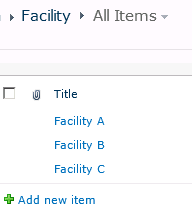
It's not easy to retrieve data from SharePoint List View in InfoPath, especially for business users.  A link like below do the job, however, it asks for GUID of the list, and the internal name of filter field, which is not so easy to implement and maintain.

http://contoso/sites/sales/_vti_bin/owssvr.dll?Cmd=Display&List={115BC7B7-0A82-403E-9327-F3C73E6D37F3}&XMLDATA=TRUE&noredirect=true&FilterField1=xd__x007b_52AE1EF8_x002d_28E7_x002d_4CE4_x002d_AE23_x002d_54E23E80DDB5_x007d_&FilterValue1=Approved


Normally we can build a web service for that InfoPath data connection.


Let's say users want to retrieve data from a list view through Data Connection, and want to bind the data to Dropdown control.


The web service could be like below:


    public class ListData : System.Web.Services.WebService
    {
        public class ReferenceData
        {
            public ReferenceData() { }

            public int ID;
            public string Title;
        }


        [WebMethod]
        public ReferenceData[] getReferenceDataFromListView(string strListViewUrl)
        {  //parameter:   http://contoso/sites/sales/Lists/products/AllItems.aspx
            StackTrace objStackTrace = new StackTrace();
            string strLogMethodPrefix = objStackTrace.GetFrame(1).GetMethod().Name + "() - ";

            ReferenceData[] resultList = null;

            try
            {
                SPSecurity.RunWithElevatedPrivileges(delegate()
                {
                    using (SPSite site = new SPSite(strListViewUrl))
                    {
                        using (SPWeb web = site.OpenWeb())
                        {
                            SPView objSPView = web.GetViewFromUrl(strListViewUrl);
                            SPList currentList = objSPView.ParentList;
                            SPListItemCollection oSPListItemCollection = currentList.GetItems(objSPView);

                            resultList = new ReferenceData[oSPListItemCollection.Count];
                            int iIndex = 0;

                            foreach (SPListItem currentListItem in oSPListItemCollection)
                            {
                                resultList[iIndex] = new ReferenceData();
                                resultList[iIndex].ID = currentListItem.ID;
                                resultList[iIndex].Title = currentListItem.Title;
                                iIndex++;
                            }
                        } // using spweb web = site.openweb()
                    }
                });
            }
            catch (Exception ex)
            {
                SPWSShared.sysWriteAppEntry(string.Format(@"{0} ex, strListViewUrl={1}", strLogMethodPrefix, strListViewUrl));
                SPWSShared.sysWriteAppEntry(string.Format(@"{0} ex.Message={1}", strLogMethodPrefix, ex.Message));
                SPWSShared.sysWriteAppEntry(string.Format(@"{0} ex.StackTrace={1}", strLogMethodPrefix, ex.StackTrace));

                throw;
            }

            return resultList;
        }
    }

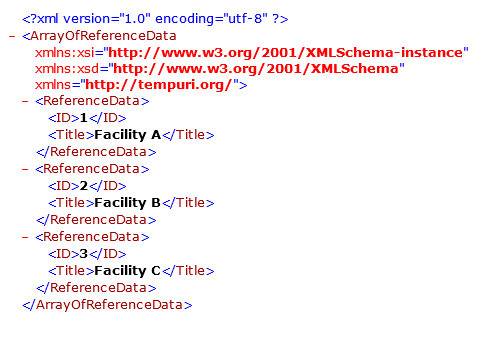
Below is the returned data.

As we can see, in the code, we need to define a internal class for the structure of the retrieved data.  It's possibly OK for small system, but in real world, we may need to create and maintain hundreds of classes, which is not acceptable.


A better solution is to build a general web service for all list views.


        [WebMethod]
        public XmlDocument getDataFromListView(string strListViewUrl)
        {   //parameter:   http://contoso/sites/sales/Lists/products/AllItems.aspx
            StackTrace objStackTrace = new StackTrace();
            string strLogMethodPrefix = objStackTrace.GetFrame(1).GetMethod().Name + "() - ";


            System.Data.DataTable objDataTable = null;
            XmlDocument xmlDoc = new XmlDocument();
            string strReturn = @"";


            if (string.IsNullOrEmpty(strListViewUrl))
            {
                strReturn += @"";
                xmlDoc.LoadXml(strReturn);
                return xmlDoc;
            }


            try
            {
                SPSecurity.RunWithElevatedPrivileges(delegate()
                {
                    using (SPSite site = new SPSite(strListViewUrl))
                    {
                        using (SPWeb web = site.OpenWeb())
                        {
                            SPView objSPView = web.GetViewFromUrl(strListViewUrl);
                            if (objSPView != null)
                            {
                                SPList currentList = objSPView.ParentList;
                                SPListItemCollection oSPListItemCollection = currentList.GetItems(objSPView);
                                //SPWSShared.sysWriteAppEntry(string.Format(@"{0} oSPListItemCollection.Count={1}", strLogMethodPrefix, oSPListItemCollection.Count));


                                objDataTable = oSPListItemCollection.GetDataTable();


                                string strItem = string.Empty;


                                strReturn += @"";
                                foreach (System.Data.DataRow currentItem in objDataTable.Rows)
                                {
                                    strItem = string.Empty;
                                    foreach (System.Data.DataColumn currentColumn in objDataTable.Columns)
                                    {
                                        strItem += string.Format("<{0}>{1}", currentColumn.ColumnName, currentItem[currentColumn.ColumnName]);
                                    }
                                    strReturn += string.Format("{0}", strItem);
                                }


                                strReturn += @"";
                            }
                            else
                            {
                                SPWSShared.sysWriteAppEntry(string.Format(@"{0} List view URL ({1}) is invalid!", strLogMethodPrefix, strListViewUrl));
                            }
                        }
                    }
                });
            }
            catch (Exception ex)
            {
                SPWSShared.sysWriteAppEntry(string.Format(@"{0} ex, List view URL ({1}) is invalid!", strLogMethodPrefix, strListViewUrl));
                SPWSShared.sysWriteAppEntry(string.Format(@"{0} ex.Message={1}", strLogMethodPrefix, ex.Message));
                SPWSShared.sysWriteAppEntry(string.Format(@"{0} ex.StackTrace={1}", strLogMethodPrefix, ex.StackTrace));


                throw;
            }


            if (objDataTable != null)
            {
                xmlDoc.LoadXml(strReturn);
            }


            return xmlDoc;
        }

Below is the returned data.


Done.


Below are some screen shots regarding how to configure it in InfoPath.


Wednesday, September 28, 2011

Infopath - Unique form number/name generation?

This problem is always there when building InfoPath web forms.   As I know, there are many options:

  • Use "user login name" + "current time" as unique id;
Need to create a field for "unique id", and if there are millions of users, it may cause some potential conflict problem.
The "unique id" can be used as part of the file name.
The "unique id" could be quite long.
No coding needed.
  • Generate the unique ID through workflow after the form is submitted
Need to create a field for "unique id", and  need to promote this field to SharePoint column;  this column needs to be editable.
This id normally is based on the "Item ID" of the form file.
Normally cannot use this id as file name.
Can only generate the "unique id" after the form is submitted.
No coding needed
  • Generate the unique ID through coding
Need to create a field for "unique id".
The "unique id" can be used as part of the file name.


The last solution is my favorite. It's very flexible and easy to maintain.  Once the source code is ready, not hard to re-use it.

Below is the code which generate a GUID then convert it into a 11 characters unique ID string.

        public void setFileNameField()
        {
            string strElementPath = string.Empty;

            strElementPath = @"/my:myFields/my:FileName";
            XPathNavigator objFormFileName = MainDataSource.CreateNavigator().SelectSingleNode(strElementPath, NamespaceManager);
            string strFormFileName = objFormFileName.Value;
            if (string.IsNullOrEmpty(strFormFileName))
            {
                strFormFileName = string.Format("{0}", GenerateUniqueId());
                objFormFileName.SetValue(strFormFileName);
            }
        }

        public string GenerateUniqueId()
        {   //http://madskristensen.net/post/Generate-unique-strings-and-numbers-in-C.aspx
            string strId = string.Empty;

            byte[] buffer = Guid.NewGuid().ToByteArray();
            long lUniqueId = BitConverter.ToInt64(buffer, 0);

            StringBuilder sb = new StringBuilder(7);
            while (lUniqueId > 0)
            {
                int mod = (int)(lUniqueId % 62);
                if (mod < 10)
                {
                    sb.Append(mod);
                }
                else if (mod < 36)
                {
                    mod += 87;
                    sb.Append((char)mod);
                }
                else
                {
                    mod += 29;
                    sb.Append((char)mod);
                }
                lUniqueId = lUniqueId / 62;
            }

            strId = sb.ToString();

            return strId;
        }

        public void FormEvents_Loading(object sender, LoadingEventArgs e)
        {
            setFileNameField();
        }

Thursday, August 11, 2011

SharePoint vs ASP.Net

SharePoint was becoming popular since MOSS 2007. And the release of SharePoint 2010 makes dream come true: it is possible to build a huge system without help from developers!

There are so many out of the box features, sometimes I even wondering why there are still so many companies choose Asp.Net instead of SharePoint foundation server 2010 (the basic free edition of SharePoint 2010).

In this post, I'd like to share some thoughts regarding the difference of development approach between Asp.net project and SharePoint project.

For Asp.Net, we don't need to purchase extra license to set up the site; for SharePoint, the license fee is quite high (unless choose the free version SharePoint Foundation Server 2010). Comparing with the cost of software development, normally it's worth to purchase a solid platform as the base of the system.

For Asp.Net, a developer doesn't need to be expert of IIS, SQL Server to join the development team; but for SharePoint, you have to be a SharePoint administrator before building even a simple web part. Or else, problems may pop up very soon.

For Asp.Net site, minor change may also ask for complete test of the whole site; for SharePoint, the whole system is data driven, so normally we only need to test in relatively small scope.

For Asp.Net site, system upgrade is definitely a big issue, so it is reasonable that clients don't want to upgrade their system unless have no other choices; for SharePoint, normally we don't need to change existing customization (assemblies) to make them compatible with the new version, and all new features are available immediately with the new version.

For Asp.Net site, we have to consider all the basic modules, such as "system backup", "disaster recovery", "user authentication", "data permission control", etc.  For SharePoint, those modules are all there, we just need to give users relevant training.

For Asp.Net, we need to confirm the main modules, the data structure and features before building the system. Then normally we start from the most basic modules, create main tables in database, then most important modules. 

For SharePoint, the system is already there! We just need to confirm that client doesn't have special requirement, such as "need to store 50 million records in one table, or have 50TB video clips".  Then we need to figure out what functionalities are needed, and how to implement them without coding. Before writing the first line of code, 90% of functionalities should be completed (configured).

The point is, in many cases, the clients don’t know what they need; and sometimes, they even don't know what they want. The world is changing so fast, it might be impossible for them to figure out what they really need.  SharePoint provides them the capability to try and then find it out. And then they can change the non-critical data structure easily.

(So far, the post above is based on 4.5 years experience on SharePoint, and around 4 years on ASP.Net)

Update (15/08/2011)
Thanks for the comments from "unknownjournal".  I agree there are many third-party framework, libraries, tools and solutions based on Asp.Net, but, in my opinion, they are really threats to system maintenance.

I have some experience on code generation tool "CodeSmith".   It's amazing to see how easy it is to build a multi-layer application with the help from code generation tool. However, when the previous developers left company, it may turns into a "forbidden area" to new developers when they try to change some modules.---- These tools, frameworks, libraries or solutions are just not popular enough (or too many bugs, not flexible, etc.)

Many times I got call from clients because they could not find resource to support their Asp.net system with some third-party components.

This problem may not be a critical issue, but is a serious risk everyone needs to evaluate before making the decision.

Update (17/08/2011)
SharePoint site is not going to replace Asp.Net site soon, not even for intranet system. Besides the license issue, the biggest problem with SharePoint is, it needs broad background knowledge for SharePoint administrators and developers.  To build a solid system, the understanding and experience of "SQL Server, network configuration, Asp.Net(IIS), security, ISA, Virtual Machine, etc." are all necessary.

SharePoint is huge monster.  If you are not good at trouble shooting, then normally would feel frustrated everyday.

Monday, August 1, 2011

Clear cascaded Lookup DropDown controls

I think, the best way to implement cascaded lookups in SharePoint is SPCD. This is a JavaScript based solution, powerful and flexible.  However, by default, the child level DropDown controls contains all items defined in the list. These items is filtered once user change the value of the parent level DropDown control, but it still may confuse end users.

Below is a simple solution, which is also based on JavaScript.

<script type="text/javascript">
function clearDropDown(LookupFieldTitle)
{
    if(getField('select',LookupFieldTitle))
    {
        //if lookup has 19 or less items - SELECT
        theDropDown = getField('select',LookupFieldTitle);
theDropDown.options.length = 0;

var opt = document.createElement("option");
opt.text = '(None)';
        opt.value = '';
theDropDown.add(opt);
    }
else
{
theDropDown = getField('input',LookupFieldTitle);
theDropDown.choices = '(None)|0';
}
}

var ccd3 = new cascadeDropdowns('Category', 'Sub Category', 'refCategory', 'refSubCategory', 'Title');

clearDropDown('Sub Category');
</script>


The function cascadeDropdowns() and getField() come from spcd.js.